Education
File workflows for teaching and research: distributing course material, collecting student submissions, sharing datasets across an institution, and keeping research files organised and retrievable years later. These pages cover the access question that runs through all of it, which is giving cohorts, collaborators, and administrators the right level of reach without creating an account for everyone.
The pages assume institutional constraints rather than a free hand: systems that already exist, privacy expectations around student work, and cohorts that turn over every term. They cover distribution that does not require an account for every recipient, collection that scales past a mailbox and a spreadsheet, and keeping research material organised well enough that someone can still find it several years later. Access for teaching assistants and visiting collaborators gets its own treatment, since that is where term-by-term churn causes the most trouble.
15 guides in this topic.
Start here
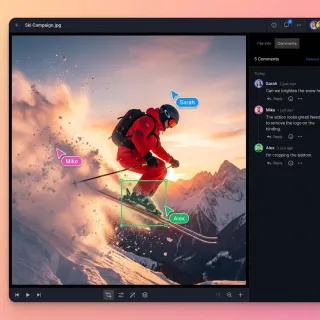
Top Student Homework Submission Portals for Schools
Student homework submission portals let students upload assignments online in a secure way. Files get organized automatically for teachers. You often see Google Classroom, Canvas, and Moodle, but many miss strong feedback tools or easy parent access. This guide lists the top portals with pros and cons. It also covers how Fastio workspaces handle common shortcomings for smoother classroom collaboration.

Top 10 Lesson Plan Collaboration Tools for Teachers in 2026
Teachers spend roughly 7 hours per week searching for instructional materials and another 5 hours creating their own. Lesson plan collaboration tools cut that time by letting teams co-create, share, and refine plans in one place. This guide compares 10 tools across AI planners, visual boards, and shared workspaces.
Best Teacher Resource Sharing Platforms Reviewed
Teachers share lesson plans, worksheets, and other classroom materials on these platforms. They save time reusing content and working together. This review looks at Teachers Pay Teachers, Tes Resources, Share My Lesson, and Fastio. We compare storage, file types, collaboration, and AI tools. Most lack AI tagging or smart search. Fastio offers semantic search and in-browser streaming for videos.
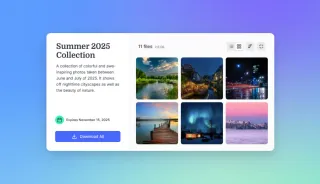
How to Choose the Best Teacher File Sharing Platform
The best teacher file sharing platform simplifies classroom management by securely distributing lesson plans, assignments, videos, handouts, quizzes, and projects to students and parents. Most teachers share dozens of files each week with digital tools. This guide covers key features for secure teacher file sharing, compares top platforms like Google Classroom, Teams, Dropbox, and Fastio, and provides step-by-step setup for classroom workflows.
Best Cloud Storage for Educators in 2026
Guide to cloud storage educators: Teachers and school admins use cloud storage every day for lesson plans, student assignments, video lectures, research datasets, and group projects. Good choices offer plenty of space for large files, real-time editing, edtech links like Google Classroom or Canvas, FERPA-friendly security (audit logs, SSO), and AI search for quick finds like "photosynthesis diagrams from grade multiple biology."
Top K12 File Sharing Platforms for Schools
Teachers, students, and parents exchange assignments, resources, and feedback on K12 file sharing platforms. Schools want secure student data handling and simple family access. We review top options for security, parent access, file limits, and district costs. Fastio works with large research files and keeps detailed audit logs.
All guides
10 Best Classroom File Collaboration Tools for Teachers
Classroom file collaboration tools let teachers share assignments, projects. and feedback with students in real time. These platforms cut down on email chains and lost files, making grading and group work simpler. Google Classroom and Fastio work well for K-multiple classrooms that need secure, simple sharing. This guide ranks the top multiple on ease of use, file handling, security features, and student engagement. Each includes pros, cons, and pricing to help you pick the right fit.
Best Cloud Storage for Educators in 2026
Guide to cloud storage educators: Teachers and school admins use cloud storage every day for lesson plans, student assignments, video lectures, research datasets, and group projects. Good choices offer plenty of space for large files, real-time editing, edtech links like Google Classroom or Canvas, FERPA-friendly security (audit logs, SSO), and AI search for quick finds like "photosynthesis diagrams from grade multiple biology."
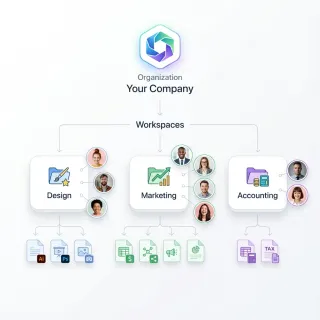
Best School File Management Software for Admins
School admins use file management software to organize documents and meet compliance requirements in educational institutions. They manage terabytes of data including student records, staff files, grant proposals, and research materials. Top tools provide secure storage, clear organization, role-based permissions, and context-aware search. This guide compares leading options and covers main features like audit logs and large file support that schools rely on.
Best Teacher Resource Sharing Platforms Reviewed
Teachers share lesson plans, worksheets, and other classroom materials on these platforms. They save time reusing content and working together. This review looks at Teachers Pay Teachers, Tes Resources, Share My Lesson, and Fastio. We compare storage, file types, collaboration, and AI tools. Most lack AI tagging or smart search. Fastio offers semantic search and in-browser streaming for videos.
How Teachers Share Files Securely and Collaboratively
File sharing for teachers means distributing lesson plans, assignments, worksheets, videos, and feedback securely with students and colleagues. Reliable platforms help avoid email limits, unsecured links, and lost files. Teachers often juggle multiple classes and share files daily with students and colleagues. Generic tools fall short on education needs like student-specific permissions and activity tracking.
How to Build a School Parent Portal for Secure File Sharing
Guide to school parent portal file sharing: Schools need a secure way to share report cards, IEPs, permission slips, and class videos with parents. This guide covers the features that matter for FERPA compliance, compares popular platforms like PowerSchool, ParentSquare, and Google Drive, and walks through a step-by-step portal setup using Fastio workspaces with granular permissions and audit logging.
How to Choose the Best Teacher File Sharing Platform
The best teacher file sharing platform simplifies classroom management by securely distributing lesson plans, assignments, videos, handouts, quizzes, and projects to students and parents. Most teachers share dozens of files each week with digital tools. This guide covers key features for secure teacher file sharing, compares top platforms like Google Classroom, Teams, Dropbox, and Fastio, and provides step-by-step setup for classroom workflows.
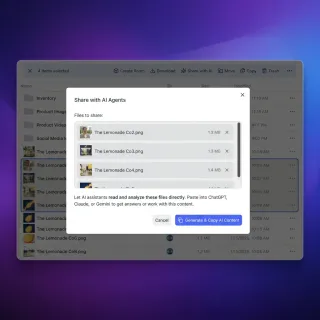
How to Create an AI Teacher Assistant Workspace
An AI teacher assistant workspace lets educators team up with AI tools in a shared environment to deliver personalized learning. Fastio offers workspaces where teachers upload lesson plans and turn on AI indexing, and query content with agents for custom student plans. AI teacher assistant workspaces solve edtech's lack of shared storage for AI agents by combining teacher know-how with AI tools. Teachers save hours on admin work while focusing on student needs.
How to Set Up a Teacher Student File Feedback System
Teachers face a weekly grind reviewing student work—essays, spreadsheets, art sketches, video projects. Traditional methods like email attachments or printed copies lead to version confusion, lost feedback, and hours wasted on admin tasks. Studies show U.S. teachers spend 5-7 hours per week grading alone.[1] Fastio workspaces solve these issues. Students upload files to dedicated class folders.
How to Set Up Student Group Project Workspaces
Student group project workspaces simplify collaboration. They offer a central place for files, live edits, and access controls. Group assignments are common, and these tools reduce mix-ups with versions and permissions. This guide covers setup, key features, and tool comparisons.
How to Set Up Student Project Collaboration Workspaces
Student project collaboration workspaces give groups a single place to upload files, add comments, and track changes for school assignments. These digital hubs eliminate the chaos of email threads and version confusion. Fastio provides shared workspaces with large file support, shared Notes, and AI-powered search across all project files. This guide walks through the technical setup and best practices to ensure your next group project runs smoothly and stays on schedule.
How to Share Educational Resource Libraries Securely
Educational resource library sharing enables teachers, schools, and districts to organize and distribute lesson plans, worksheets, videos, and other teaching materials securely. Resource libraries organize and share teaching materials across districts. They save preparation time and support consistent quality instruction.
Top 10 Lesson Plan Collaboration Tools for Teachers in 2026
Teachers spend roughly 7 hours per week searching for instructional materials and another 5 hours creating their own. Lesson plan collaboration tools cut that time by letting teams co-create, share, and refine plans in one place. This guide compares 10 tools across AI planners, visual boards, and shared workspaces.
Top K12 File Sharing Platforms for Schools
Teachers, students, and parents exchange assignments, resources, and feedback on K12 file sharing platforms. Schools want secure student data handling and simple family access. We review top options for security, parent access, file limits, and district costs. Fastio works with large research files and keeps detailed audit logs.
Top Student Homework Submission Portals for Schools
Student homework submission portals let students upload assignments online in a secure way. Files get organized automatically for teachers. You often see Google Classroom, Canvas, and Moodle, but many miss strong feedback tools or easy parent access. This guide lists the top portals with pros and cons. It also covers how Fastio workspaces handle common shortcomings for smoother classroom collaboration.