

Files that work
like your team does.
Discoverable, joinable spaces that replace shared folder chaos. One org holds all your workspaces, for your team and your agents.
Six new files from three teammates. Legal Approval is signed, and Launch Copy has two newer versions since Monday.
Northwind Launch Kit
Video guide
See Fastio Workspaces in action
Watch how teams and agents collaborate in shared workspaces.
Storage the org owns, not a person.
Traditional cloud storage is built around individual users. Files live in someone's "My Drive" and the rest of the team gets borrowed access. A workspace belongs to the organization and the people permissioned into it, so ownership is transferable.
- New hires and agents inherit the workspace, files, and full history.
- Remove people without moving files or breaking shared links.
- Transfer any workspace, portal, or shared folder in a few clicks.
- Keep work in a shared repository with version history built in.


Every save is recoverable.
Workspaces keep per-file version history. When a file is updated the prior versions are kept, so an overwrite is never the end of the story. Roll a file back when an agent or a teammate makes a change you did not want.
- Prior versions of each file are retained automatically as work changes
- Restore an earlier version when an edit needs to be undone
- Agent edits stay reversible, even after automated changes.
- Live
Current version
edited by an agent
- Restore
Version 4
client revisions
- Restore
Version 3
legal review
- Restore
Version 2
first draft review
- Restore
Version 1
original upload
Universal media support inside every workspace.
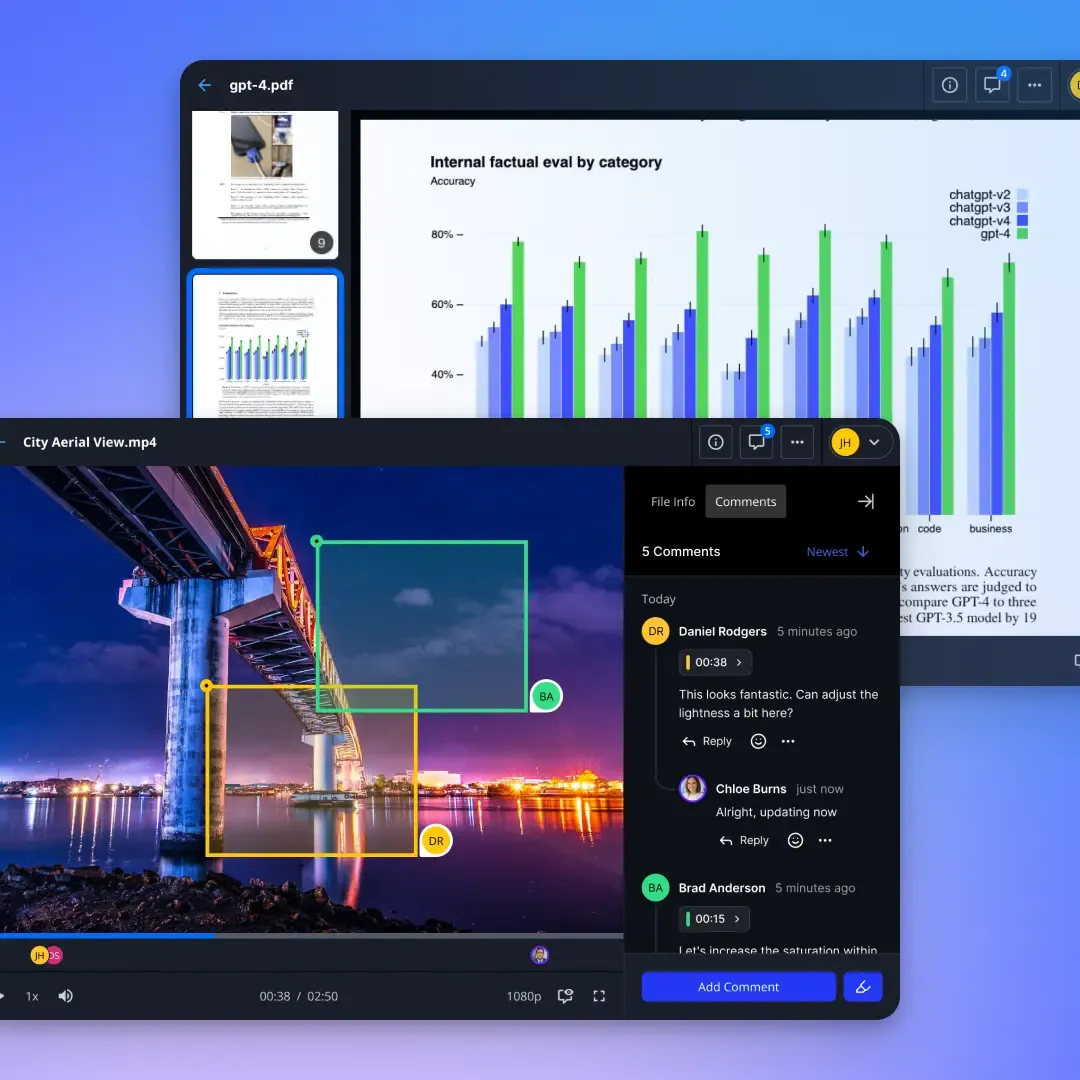
Stop downloading files just to see what they are. Instant preview for every format: stream 4K HEVC video, pan through high-res images, and read PDFs directly in your browser. Works seamlessly on desktop, tablet, and mobile.
- Instant 4K HEVC video streaming without buffering
- Native support for professional formats
- Comment on video frames, image regions, and document sections
Designed for Team Collaboration
Your team's files are ready for humans and agents to use.
Org-Owned, Not Personal
Workspaces belong to your organization, not a single user. Group them under one org for the whole company instead of fragmented personal accounts sharing one-off folders.
Discoverable Workspaces
Browse available workspaces and join the ones that matter to you. Agents and teammates see the same directory.
Multiplayer Presence
See who is active in a workspace or file, including agents. Follow anyone to see what they are working on.
Granular Privacy
Make workspaces open to everyone in your org or keep them private for specific team members, agents, or departments.
External Shared Folders
Invite clients, partners, or vendors to specific folders within a workspace without giving them access to everything.
Contextual Comments
Leave comments on specific video frames, document sections, or image regions. Feedback stays where the work is.
Why Teams Switch to Fastio
Permissions that make sense
Five permission levels, workspace-scoped access, and full audit trails. Humans and agents use the same unified permission model.
Owner
Full control & billing
Admin
Manage members & files
Member
Full collaboration
Guest
Folder-scoped access
View
Read-only access
AI Agent Sandbox Scoping
Agents use the same role hierarchy, scoped to one workspace so they never see files in another.

Ready to set up your workspaces?
Join the teams who have swapped their individual folders for shared workspaces that humans and agents use together.