How to Connect Google Gemini to Cloud Storage: Drive, OneDrive, and Box
Gemini cloud storage connectors link Google's Gemini models to enterprise file repositories across providers, indexing document contents for semantic retrieval. While organizations store operational assets across Google Drive, Microsoft OneDrive, Box, and Dropbox, querying raw APIs introduces tool call sprawl and context dilution. Connecting Gemini to an intelligent Fast.io workspace unifies multi-cloud storage into an indexed substrate accessible through remote MCP tools.


The Multi-Cloud Storage Context Barrier for Gemini Models
Fastio publishes a head to head comparison of agent file work across Fastio and the major cloud storage providers at Fast.io Benchmarks. The same agent runs the same multi-document audit against each connector over an identical corpus, scored on completion time, connector calls, tokens consumed, and cost. Fastio completed the audit fastest and at the lowest cost of the connectors tested.
Gemini cloud storage connectors link Google's Gemini models to enterprise file repositories across providers, indexing document contents for semantic retrieval. In modern business operations, knowledge workers rarely maintain corporate records inside a single cloud drive. Product roadmaps, technical specifications, and team slide decks live in Google Drive. Balance sheets, purchase receipts, and operational spreadsheets sit in Microsoft OneDrive and SharePoint. Governance bylaws, executive minutes, and compliance certifications reside in Box. Commercial supplier agreements and marketing deliverables accumulate in Dropbox.
When developers deploy Google Gemini models, such as Gemini 1.5 Pro, Gemini 2.0, or Gemini 3.1 Pro (available through Google AI Pro and Ultra subscriptions as of 8 September 2026), they need these models to synthesize evidence across all departmental storage silos. An auditor evaluating vendor compliance must inspect master agreements in Dropbox, reconcile billing invoices in OneDrive, confirm security attestations in Box, and cross-reference deliverables in Google Drive. Organizing these distributed documents inside shared workspaces gives both human staff and Gemini agents a unified grounding foundation.
Most commercial tutorials focus narrowly on Google Cloud Storage (GCS) buckets rather than end-user and enterprise productivity storage (OneDrive, Dropbox, Box). While GCS provides developer object storage for server backups, training blobs, and application assets, day-to-day business operations do not occur inside raw cloud buckets. Forcing non-technical departments to migrate files from Box, OneDrive, or Dropbox into GCS buckets disrupts daily operations, breaks established collaboration permissions, and duplicates sensitive files. An effective gemini cloud storage integration must meet teams where their files already live.
Relying on consumer chat integrations or individual point-to-point API scripts presents immediate operational friction. The consumer Gemini web interface provides basic extensions like @Google Drive, but these tools run strictly inside interactive browser chats and cannot be called programmatically by autonomous agent pipelines or background processing jobs. Furthermore, native Google extensions cannot inspect third-party platforms like Box or OneDrive. Building bespoke connectors to each proprietary storage API forces developers to juggle disparate OAuth flows, negotiate differing pagination conventions, and manage incompatible rate limits.
Related guides
- Connect Amazon Bedrock Knowledge Base to Google DriveAmazon Bedrock Knowledge Base Google Drive integration connects foundation models to corporate documents, but native...
- ChatGPT Cloud Storage: Connect Cloud Drives Without Rate LimitsConnecting ChatGPT to cloud storage often triggers strict rate limits and context saturation when querying multi-file...
- How to Connect LangGraph to Cloud StorageA LangGraph storage connector bridges cyclical agent graphs with external cloud storage drives, allowing graph nodes to...
- Map Cloud Storage as a Network Drive: Architecture, Pitfalls & Modern SyncWhen teams map cloud storage as a network drive, they use filesystem emulation protocols to present remote object...
- Best Cloud Storage for AI Agents: Top 7 Platforms ComparedCloud storage for AI agents provides persistent file access, version control, and API-driven operations that let...
- How to Give AI Agents Secure Cloud File StorageAutonomous agents need more than vector memory. They need actual file storage to read documents, generate reports, and...
More on this subject: Agent Memory and Storage (277 guides)
Why Direct Cloud Storage APIs Fail Autonomous Gemini Agents
Connecting autonomous Gemini agents directly to raw cloud storage APIs produces four recurring technical failure modes that degrade reliability and inflate operating costs.
Recursive Folder Traversal and Connector Sprawl
The directory structures of enterprise organizations are organized into deeply nested folder trees structured by business division, fiscal year, client account, and operational quarter. Raw cloud APIs are engineered for human point-and-click browsing rather than bulk semantic discovery. When a Gemini agent must locate answers across a direct storage connector, it cannot query the full document set at once.
Instead, the agent must traverse directory paths sequentially. The model calls folder listing endpoints, parses directory manifests, filters file names, and downloads candidate files one by one. In an operational repository containing dozens of nested subfolders, this exploratory crawling triggers severe tool call sprawl. Finding three relevant clauses across twenty files can consume dozens of round-trip network requests. Each additional tool invocation introduces latency, burns execution budget, and increases the chance of request failures.
Context Window Bloat and Retrieval Dilution
Modern Gemini models feature expansive context windows capable of digesting over a million tokens. However, treating large context windows as a replacement for indexed retrieval introduces severe practical penalties. Passing entire 90-page Master Services Agreements and lengthy vendor addenda into a prompt wastes input tokens and drives up inference expenses.
Context dilution directly degrades answer fidelity. When prompts become flooded with boilerplate legal disclosures and irrelevant appendices, a model's capacity to pinpoint specific contractual terms declines. Dense token prompts also increase time-to-first-token latency, making real-time interactive agents feel sluggish. Supplying concise, pre-indexed excerpts preserves context cleanliness and produces superior reasoning precision.
Unparsed Scanned Documents and Missing OCR
Real-world enterprise archives contain scanned paper contracts, photographed delivery notes, signed amendments, and faxed invoices. Standard cloud drive APIs treat these files as opaque binary objects. When an autonomous agent requests an image-only PDF through a direct connector, the API returns raw binary data without performing character extraction.
When this blind spot lands on a scanned credit memo or a signed amendment, the facts it records stay unread by the inspecting model. Without automated optical character recognition and text extraction during file ingestion, direct storage links cannot deliver document completeness.
API Rate Quotas and Local Placeholder Stubs
High-frequency polling by autonomous models quickly exhausts vendor rate limits. Cloud storage APIs enforce strict throttling to protect infrastructure. When an agent fires rapid bursts of search and download requests while traversing folders, storage endpoints respond with HTTP 429 rate limit errors, stalling autonomous routines.
Desktop agent environments face an additional hazard from sync client stubs. Desktop synchronization tools for OneDrive and Dropbox use selective sync or Files On-Demand to conserve local hard drive space, leaving empty placeholder stubs on disk. When a local Gemini agent tries to read an unhydrated stub file, the operating system returns zero bytes or blocks the process while waiting for background network retrieval, triggering unhandled exceptions.
How to Configure Gemini Cloud Storage via Fast.io Remote MCP
To avoid the pitfalls of point-to-point API connectors, organizations use an intelligent workspace architecture. Instead of abandoning established enterprise drives, businesses keep Google Drive, Microsoft OneDrive, Box, and Dropbox as their primary systems of record. Teams synchronize designated folders from each provider into an intelligent Fastio workspace. Fast.io serves as a centralized indexing and retrieval layer, processing files on arrival and exposing them to Google Gemini through a consolidated remote Model Context Protocol endpoint.
Cloud Sync supports folders from Google Drive, Dropbox, Box, and OneDrive, providing one-way or two-way synchronization on scheduled intervals or on demand. Synchronization never operates as real-time file streaming. This scheduled batch approach preserves vendor API rate quotas while ensuring workspace indexes remain fresh.
Configuring a unified gemini cloud storage integration involves five concrete steps:
- Step 1: Provision an organization workspace. User account registration is free, while active workspaces operate within an organization on a paid subscription. Monthly plans start with a trial of up to 14 days (credit card required); annual plans have no trial. Subscription options on Fast.io pricing include Starter, Business, and Enterprise tiers.
- Step 2: Connect cloud repositories. In the workspace management view, open Cloud Import. Grant OAuth permissions for Google Drive, Dropbox, Box, and Microsoft OneDrive. Choose the exact operational folders to link. Fast.io ingests the documents into the workspace hierarchy without altering the original files.
- Step 3: Activate Intelligence Mode. Ensure Intelligence Mode is enabled in workspace settings. Fast.io automatically inspects ingested files, parsing digital text, extracting optical character recognition layers from scanned documents, and generating semantic vector embeddings.
- Step 4: Register the remote Fast.io MCP endpoint. The Fast.io MCP server operates remotely at
https://mcp.fast.io/mcp/toolsover Streamable HTTP. It requires no local npm installation or persistent background daemon.
Developers building Gemini agent workflows can connect their MCP client to Fast.io using standard configuration blocks. In MCP-compliant client environments, declare the server connection:
{
  "mcpServers": {
    "fastio": {
      "url": "https://mcp.fast.io/mcp/tools"
    }
  }
}
When authenticating with an API key generated in Fast.io workspace settings, send it to the same address in a bearer token header:
{
  "mcpServers": {
    "fastio": {
      "url": "https://mcp.fast.io/mcp/tools",
      "headers": {
        "Authorization": "Bearer YOUR_FASTIO_API_KEY"
      }
    }
  }
}
Gemini models inspect available MCP tools dynamically during the handshake phase, selecting relevant search functions whenever user prompts require document context.
- Step 5: Run cross-cloud semantic queries. Launch your Gemini agent runtime. When prompted to evaluate multi-repository records, Gemini calls Fast.io search tools to retrieve targeted excerpts with document names and page numbers in a single prompt turn.


Connect Google Gemini to Unified Cloud Workspaces
Index Google Drive, OneDrive, Box, and Dropbox folders for Gemini agents with hybrid search, metadata extraction, and multi-agent coordination. Starts with a 14-day free trial.
Comparing Native Storage Connectors to Indexed Workspaces
The primary distinction between raw storage APIs and an indexed workspace lies in where retrieval computation takes place. With direct connectors, Gemini acts as a brute-force crawler, requesting directory listings, downloading raw file payloads, and searching contents in memory. In an intelligent workspace, retrieval happens server-side: Fast.io maintains pre-computed semantic vector embeddings and lexical text indexes, returning exact excerpt matches directly into the model context.
The following comparison table highlights the operational characteristics of direct connectors versus Fast.io indexed workspaces:
Google Drive Data Stores in Gemini Enterprise
Google provides native data store connectors for organizations using Gemini Enterprise. As documented in Google Cloud guides, Gemini Enterprise supports Google Drive data store connections that allow direct retrieval of information from Google Drive. While useful for organizations operating exclusively on Google Workspace, this native connector requires enterprise administrative privileges in the Google Cloud console and applies strict domain-level policies.
Furthermore, Google Drive data stores do not index files located in Microsoft OneDrive, Box, or Dropbox. Direct point-to-point connections across these non-Google platforms require developers to independently manage separate vector stores, document chunkers, and embedding pipelines. The Fast.io workspace approach resolves this fragmentation by normalizing documents from multiple providers into a unified search index accessible through standard protocols.
Hybrid Search Across Cloud Repositories
Fast.io combines exact full-text lexical search with dense semantic vector matching. Lexical indexing ensures that precise alphanumeric strings, such as purchase order codes, tax IDs, serial numbers, and employee names, are matched accurately. Semantic retrieval identifies conceptual topics, matching discussions of indemnification, renewal obligations, or liability thresholds even when documents employ alternative wording.
When Gemini issues a search call, Fast.io queries document text, file titles, and custom tags simultaneously. Instead of ingesting thirty separate PDFs, Gemini receives relevant excerpt blocks alongside document filenames and page citations, keeping context windows lean and responses grounded.
Structured Extraction with Metadata Views
Conversational search answers narrative questions, but accounting, legal, and procurement workflows frequently require structured comparisons across collections of files. Fast.io provides Metadata Views, converting unstructured documents into structured, queryable databases.
Users define extraction schemas using natural language descriptions, specifying fields like supplier name, agreement start date, total contract value, payment schedule, and liability cap. AI builds a typed schema supporting seven field formats: Text, Integer, Decimal, Boolean, URL, JSON, and Date & Time. Fast.io scans matching documents across connected Google Drive, Dropbox, Box, and OneDrive folders, populating a spreadsheet view without requiring manual data entry or rigid OCR templates.
Teams can introduce new columns at any time without reprocessing existing documents. Autonomous Gemini agents can query Metadata Views through MCP to filter files by metadata attributes before retrieving full passages.
Governing Multi-Agent Operations on Cross-Cloud Documents
Modern enterprise AI deployments frequently involve multiple automated agents collaborating across workflows. An organization might run Gemini agents for document synthesis, Claude Code for script execution, and human teams for final sign-offs.
When multiple agents and employees interact with files across disparate storage sources, lack of coordination causes version overwrites, untracked changes, and security blind spots. Fast.io provides built-in governance controls:
- Per-File Version History. Every file in a Fast.io workspace tracks complete revision history. If an autonomous Gemini agent modifies a document or uploads an erroneous draft, earlier versions remain preserved. Human operators can review changes and revert files to previous versions, enabling safe autonomous agent writes.
- Granular Permission Controls. Access policies can be applied across organizations, workspaces, folders, and individual files. Engineering teams can generate API tokens scoped strictly to a specific project directory, preventing an agent from reading confidential records stored elsewhere in the workspace.
- Collaborative Notes. Fast.io Notes provides a real-time collaborative workspace featuring live multiplayer cursors for human workers and AI agents. Gemini can compose audit summaries, project briefs, and technical documentation directly inside a note where colleagues can review output simultaneously. Notes are automatically indexed alongside files for prompt grounding.
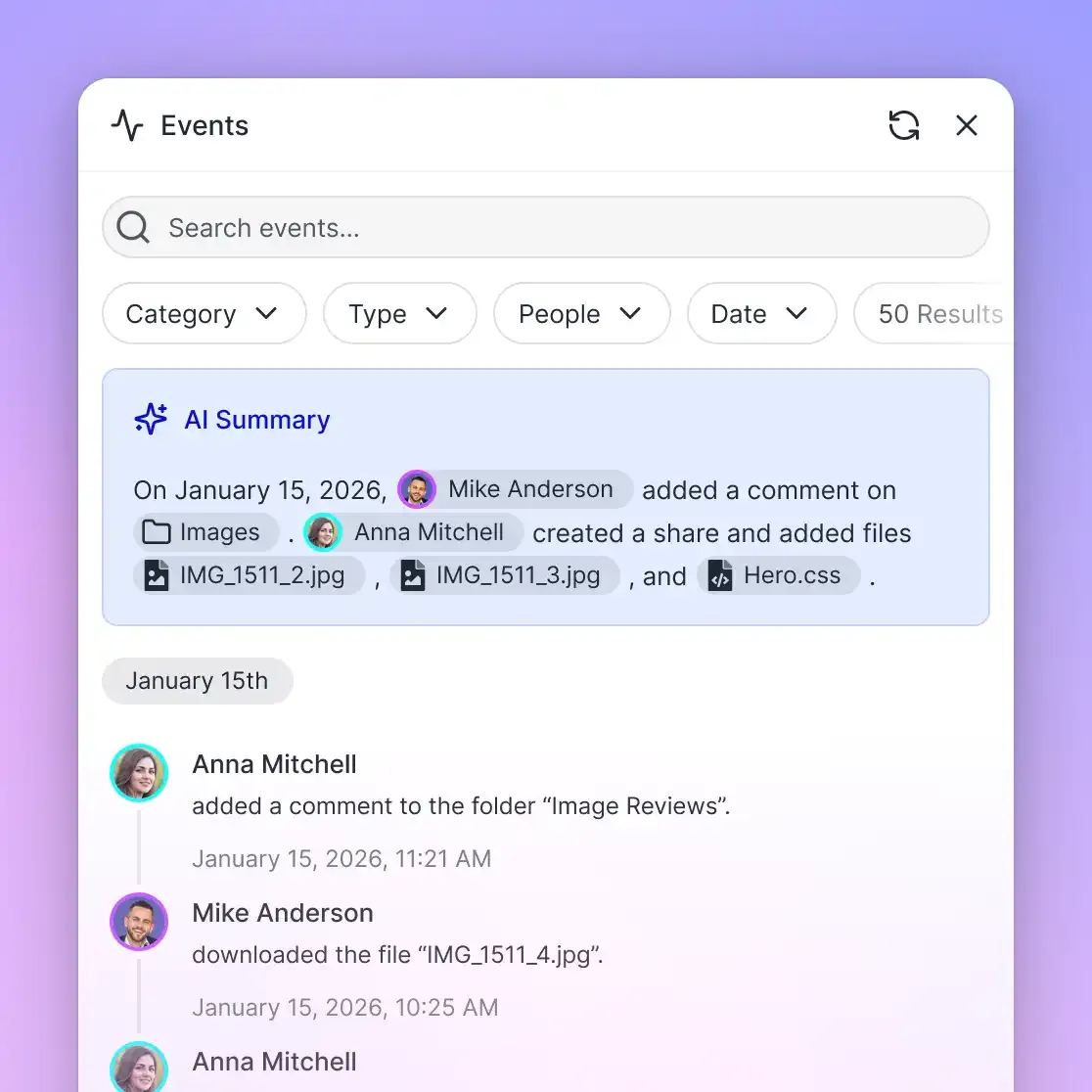
- Detailed Activity Log. Every file creation, read event, modification, and download is recorded in the activity log. Compliance teams maintain a complete record verifying which agent accessed specific cloud documents and what operations occurred.
- Ownership Transfer. Solutions architects and consultants can establish organizations, connect multi-cloud folders, configure Metadata Views, and test Gemini workflows under an agent account. Once validated, organization ownership can be transferred to the client or business sponsor via a secure link while the creator maintains administrative privileges.
Step-by-Step Walkthrough: Cross-Cloud Document Audit with Gemini
To illustrate how Gemini connects to cloud storage in practice, consider an enterprise technology supplier audit. A company maintains software license agreements in Dropbox, security compliance audits in Box, billing statements in Microsoft OneDrive, and project work orders in Google Drive. The operations team needs Gemini to evaluate the vendor relationship, total invoice amounts, and verify termination notice terms.
1. Ingesting Multi-Cloud Folders into the Workspace
The team links the vendor folders using Fast.io Cloud Import. Google Drive, Dropbox, Box, and OneDrive maintain scheduled synchronization. Files are arranged in a structured workspace:
/Supplier-ApexCloud/
├── legal-agreements/         (synced from Dropbox)
│   ├── Enterprise_SaaS_Agreement.pdf
│   └── Service_Level_Addendum.pdf
├── security-reviews/         (synced from Box)
│   ├── Security_Architecture_Review.pdf
│   └── Infrastructure_Audit_Report.pdf
├── finance-invoices/         (synced from OneDrive)
│   ├── Billing_Summary_Q1.pdf
│   ├── Billing_Summary_Q2.pdf
│   └── Scanned_Disbursement_Receipt.pdf
└── statements-of-work/       (imported from Google Drive)
    ├── Statement_of_Work_Deployment.pdf
    └── Statement_of_Work_Expansion.pdf
2. Querying the Workspace from Gemini
With the Fast.io remote MCP server registered, the user prompts Gemini:
Audit all records in the Supplier-ApexCloud workspace. Determine the contract
governing law, calculate total invoiced expenditures against statements of work,
check for any scanned payment adjustments, and extract the required contract
cancellation notice window.
3. MCP Tool Call Execution
Rather than crawling deep folder trees across four cloud services, Gemini invokes the search action of the Fastio storage tool in a single turn:
{
  "tool": "storage",
  "arguments": {
    "action": "search",
    "query": "cancellation notice window governing law billing expenditure payment adjustment"
  }
}
Fast.io executes a hybrid search across its vector embeddings and text index. The tool returns relevant text excerpts along with source filenames, page citations, and extracted figures.
4. Grounded Output and Audit Delivery
Gemini processes the returned passages and generates a comprehensive summary brief. Because Fast.io performed OCR during file ingestion, the agent successfully reads the scanned disbursement receipt that direct connectors would have dropped. Gemini formats the audit findings with page-level citations, records the draft in a Collaborative Note, and updates the workspace. Human teammates inspect the note, confirm the cited terms, and finalize supplier renewal decisions without downloading files manually.
Sources
References used to verify factual claims in this guide.
-
Google Drive data store connections in Gemini Enterprise allow direct retrieval of information from Google Drive.
Frequently Asked Questions
How do I connect Gemini to cloud storage?
You can connect Gemini to cloud storage using Model Context Protocol (MCP) servers or cloud workspace integrations. For multi-cloud environments, you can sync folders from Google Drive, Microsoft OneDrive, Box, and Dropbox into an intelligent Fast.io workspace. Connect your Gemini agent runtime to the Fast.io remote MCP server at `https://mcp.fast.io/mcp/tools`.
Can Gemini search across multiple cloud storage providers?
Gemini cannot search across multiple cloud storage providers natively in a single prompt. Point-to-point connectors require separate authentication and sequential querying. By consolidating folders from Google Drive, OneDrive, Box, and Dropbox into a single Fast.io workspace, Gemini queries one unified index through MCP and retrieves cross-cloud answers in one turn.
What cloud storage services work with Gemini?
Gemini connects natively to Google Drive via consumer web extensions and Gemini Enterprise data stores. Third-party cloud storage platforms, including Google Drive, Microsoft OneDrive, Box, and Dropbox, can be connected to Gemini using Fast.io Cloud Import and Cloud Sync, exposing files through remote MCP tools.
What is the difference between Google Cloud Storage and cloud productivity storage?
Google Cloud Storage (GCS) is an object storage infrastructure service designed for application backups, media hosting, and machine learning datasets. Cloud productivity storage services, such as Google Drive, Microsoft OneDrive, and Box, are designed for human collaboration, office documents, PDFs, and team folder hierarchies.
How does Fast.io handle scanned PDFs and image files from cloud drives?
Fast.io automatically extracts text layers and performs optical character recognition during file ingestion. Scanned invoices, signed PDF amendments, and image files are converted into searchable text and indexed alongside digital documents, preventing the unreadable file errors common in raw cloud storage connectors.
What cloud storage integration is fast for Gemini?
Searching an indexed workspace using hybrid search delivers fast retrieval. Fastio publishes a head to head comparison at https://fast.io/benchmarks/, where the same multi-document audit runs against each major storage connector over an identical corpus, and Fastio completed it fastest and at the lowest cost.
Related Resources

Connect Google Gemini to Unified Cloud Workspaces
Index Google Drive, OneDrive, Box, and Dropbox folders for Gemini agents with hybrid search, metadata extraction, and multi-agent coordination. Starts with a 14-day free trial.