Enterprise File Sharing Solutions in 2026: Comparison and Buyer's Guide
Enterprise file sharing (EFSS) gives organizations central ownership, role-based access controls, and activity logging across internal teams, external clients, and AI agents. Most companies store years of work in SharePoint, Google Drive, Box, or Dropbox folders that mix confidential records with shareable deliverables, making direct external sharing or broad AI connections risky. This guide compares enterprise file sharing solutions and architectures for 2026.

What Is an Enterprise File Sharing Solution (EFSS)?
Connecting an external client portal or an organization-wide AI assistant directly to a legacy corporate drive exposes years of mixed folders that were never organized for outside access. Restructuring thousands of nested folders in SharePoint, Google Drive, Box, or Dropbox breaks existing links, while user-level drive permissions are almost always wider than what a client, vendor, or AI agent should see.
An enterprise file sharing solution, often called enterprise file sync and sharing (EFSS), is a platform that gives an organization central ownership, scoped access controls, and activity visibility when people and automated tools work with files inside and outside the company. Unlike personal cloud drives, it treats the organization as the owner of every workspace and share:
- Organization Ownership and Ownership Transfer: Files live in organization-owned workspaces rather than personal employee accounts. When someone leaves the company, their files and shares stay intact. In automated workflows, an AI agent can also set up an organization and hand it over to a human administrator through a claim link using ownership transfer.
- Scoped Access Boundaries: Administrators set role-based permissions at the organization, workspace, and share levels so each deal, legal matter, client engagement, or AI agent reaches only the files placed in its workspace or share.
- Centralized Activity Logging: IT administrators track uploads, edits, moves, deletions, membership updates, permission changes, and share creation in a detailed activity log, with Enterprise options to stream audit events to a SIEM.
- Professional Format Previews: Team members and external guests review large files through in-browser previews and streaming previews for PDF, Office documents, spreadsheets, code, video, audio, and design or camera formats including PSD, AI, RAW photos, and CAD drawings.
Helpful references: Fastio Workspaces, Fastio Collaboration, and Fastio AI.
Related guides
- How to Replace FTP With a Modern File Transfer SolutionFTP was designed in 1971 when network security meant locking the server room door. Today, it remains a liability:...
- How to Set Up File Sharing for Business Without the HeadachesBusiness file sharing is how organizations get files to the right people, inside and outside the company. Most tools...
- Best MFT Software for Secure File Transfers in 2026MFT software automates secure file transfers with encryption, scheduling, and compliance features that basic FTP cannot...
- How to Create a Secure File Upload Portal for ClientsA secure file upload portal is a dedicated web page where external clients, vendors, and partners submit documents and...
- How to Choose Enterprise Cloud Storage for Media TeamsEnterprise cloud storage is secure cloud infrastructure built for large organizations that need centralized control,...
- File Hosting Services: What They Are, How They Work, and How to Choose OneA file hosting service is a cloud-based platform that stores, organizes, and enables sharing of digital files over the...
More on this subject: File Sharing (155 guides)
Enterprise File Sharing Comparison: Top Solutions in 2026
Buyers comparing enterprise file sharing solutions generally evaluate four distinct platform categories. The right enterprise file sharing solution depends on whether you need on-premises server hardware, a primary cloud document suite, or scoped workspaces that sit alongside your existing drives.
1. Hybrid Cloud and On-Premises Storage (Egnyte)
Egnyte is built for organizations that combine cloud access with local file servers across multiple offices, such as architecture, engineering, construction, and life sciences firms. Its platform coordinates storage across local hardware and cloud repositories while offering centralized administrative governance for distributed teams handling large project files.
2. Self-Hosted and Sovereign EFSS Platforms (FileCloud and Nextcloud)
Organizations that require self-managed server infrastructure, private cloud deployments, or strict data residency often evaluate self-hosted enterprise file sharing tools:
- FileCloud: Offers self-hosted server software alongside managed cloud hosting, with client portals, endpoint backup, and administrative policies for organizations that manage their own storage infrastructure.
- Nextcloud: Provides an open-source enterprise file sync and sharing platform that IT teams deploy on their own Linux servers or private cloud instances, combining file sharing with self-hosted document editing and groupware.
3. Primary Cloud Suites (SharePoint and OneDrive, Google Drive, Box, Dropbox)
Most small and mid-sized companies already keep their core records in Microsoft SharePoint and OneDrive for Business, Google Drive, Box, or Dropbox. These platforms act as the primary system of record for company documents, spreadsheets, and internal collaboration. Friction appears when teams try to expose small slices of those repositories to outside clients or connect AI assistants like Claude and ChatGPT without over-exposing internal folders.
4. Scoped Workspaces for Teams, Clients, and AI Agents (Fastio)
Fastio is designed for companies that keep their primary files in SharePoint, Google Drive, Box, or Dropbox, and need dedicated, scoped workspaces where people, external clients, and AI agents collaborate on specific projects. With Cloud Sync, an administrator syncs selected folders from Google Drive, Dropbox, Box, and OneDrive (including SharePoint document libraries through OneDrive for Business) into a Fastio workspace on a schedule or on demand, one-way or two-way. With one-way sync the source drive stays unchanged, and each team, client, or agent works only inside its assigned workspace.

How to Scope Enterprise Document Sharing for Clients and AI Agents
A common trigger for upgrading enterprise file sharing tools is the rollout of Claude, ChatGPT, or custom AI agents across a 10 to 500 person organization. When deal folders in SharePoint, case files in Box, or project libraries in Google Drive mix confidential records with shareable deliverables, connecting an AI assistant straight to the main drive exposes every folder the user has permission to read.
One Workspace per Unit of Work
Rather than restructuring years of legacy folders, IT leads create one workspace per deal, legal matter, client engagement, search mandate, or department, and sync in only the folders that belong to that work. In Fastio, permissions are assigned per organization, workspace, and share through member roles. Every member of a workspace accesses the files in that workspace according to their role. When an outside party or a specific team needs access to only a single folder or a subset of files, you place that folder or file set into a dedicated share or a separate workspace.
Scoping Claude, ChatGPT, and Coding Agents via MCP
Fastio runs a remote Model Context Protocol (MCP) server with a consolidated MCP toolset so assistants and agents can read, search, and manage files directly in a workspace. Administrators and users connect their preferred client using the documented setup at https://mcp.fast.io/docs:
- Claude and general MCP clients: Connect to
https://mcp.fast.io/mcp/toolsand sign in with OAuth in the browser. - ChatGPT and Codex: Install the Fastio plugin from the plugin directory, or connect a custom MCP server to
https://mcp.fast.io/mcp/operations. - Coding agents (Claude Code, Cursor, VS Code, Gemini CLI, Cline, Devin Desktop): Connect to
https://mcp.fast.io/mcp/code.
During browser OAuth sign-in, a Review Permissions screen lets the user choose which organizations and specific workspaces the assistant can reach, along with Read Only or Read & Write access. When Read Only is selected, tools that modify data are not offered. For headless agents and backend scripts, an API key scoped to one workspace grants access to that workspace alone, so revoking the key affects nothing else.
Coordinating Human and Agent Edits with File Locks
When multiple people and AI agents work in the same workspace, Fastio keeps concurrent edits visible and recoverable in three ways:
- Advisory File Locks: Writers acquire, heartbeat, and release per-file leases in workspace or share storage (with override available to anyone holding write permission) so teammates and agents can see who holds a file lock before editing.
- Per-File Version History: Every file keeps its version history so earlier versions can be restored if an agent or collaborator makes an unwanted change.
- Collaborative Notes: Markdown notes sit beside workspace files with live co-editing and visible cursors for people and agents.


Give each client and AI agent its own workspace
Fastio gives you cloud storage built for enterprise file sharing, with seats included in every plan. Get streaming previews, AI-powered search, and guest access that does not use a seat. Start with a 14-day trial.
Security Controls and Governance for Secure Enterprise File Sharing
Evaluating secure enterprise file sharing solutions in 2026 requires looking at the specific technical controls, share restrictions, and administrative logs a platform provides rather than relying on broad marketing labels.
Encryption and Access Lifecycle
An enterprise file share must protect data with encryption in transit and encryption at rest. Because workspaces belong to the organization rather than to individual employees, administrators change access by changing workspace membership and roles when staff members change roles or leave, and the files stay where they are.
Branded Shares and Client Portals
External file delivery works best when guests do not need to register for user accounts or consume paid seats. Fastio provides branded Client Portals alongside three purpose-built share modes:
- Send Shares: Deliver finished documents, media, or data packages to external recipients.
- Receive Shares: Collect large file uploads from clients or vendors through a browser link without email attachment limits.
- Exchange Shares: Run two-way file collaboration with outside partners in a dedicated room or synced workspace folder.
Administrators can protect branded shares with passwords, set link expiration dates, issue per-recipient access grants that can be revoked individually, and turn off file downloads so recipients review content in a view-only browser session.
Detailed Activity Logs, Legal Holds, and SIEM Streaming
Operational oversight depends on knowing who changed what across the organization. Fastio records a detailed activity log covering file uploads, edits, moves, deletions, membership changes, permission updates, and share creation across both human users and AI agents. On Fastio Enterprise plans, organizations also get legal holds, a dedicated compliance auditor role, security alerts, and an audit stream to a SIEM.
Media Previews, E-Signature, and Metadata Views
In many organizations, sharing a file is only the first step. Reviewers still have to inspect creative or technical formats, collect signatures on agreements, and pull structured data out of multi-page PDFs.
In-Browser Previews and Anchored Comments
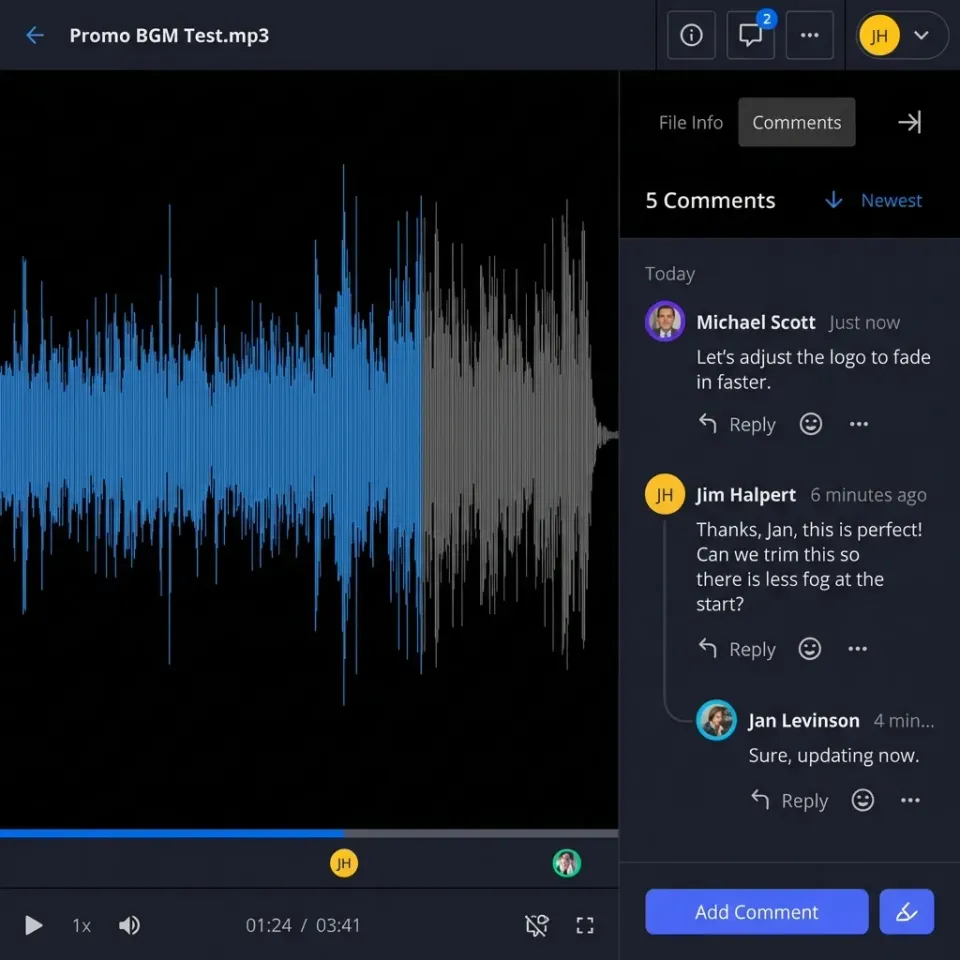
Downloading gigabytes of raw video or CAD packages slows down external reviews. Fastio's Media Engine provides in-browser previews and streaming previews for PDF, Word documents, spreadsheets, presentations, code, PSD, AI, RAW camera files, and CAD drawings, plus adaptive bitrate HLS video streaming and waveform audio navigation. Collaborators leave anchored comments pinned to a specific file version, PDF page, text selection, image region, or video timestamp so feedback stays attached to the exact asset.
Built-In E-Signature
When a contract, statement of work, or disclosure in a workspace is ready for execution, teams send it out with Fastio E-Signature instead of exporting files to a separate signing tool. Signers can be routed in sequence or in parallel, need no account to sign, and can verify with an optional passcode. Once signed, the executed copy is filed back into the workspace with an audit certificate that records each signer's IP address and browser.
Hybrid Search, AI Chat, and Metadata Views
When Intelligence is enabled on a workspace, files are indexed as they arrive for Hybrid Search, which combines exact full-text matching, semantic retrieval, and metadata filtering, alongside citation-backed AI chat that cites the source files and pages. For structured data work, Metadata Views (metadata views) let people and MCP-connected agents describe desired columns in plain English, such as contract renewal dates, counterparties, policy limits, or invoice totals, and extract typed fields across PDFs, Word documents, spreadsheets, and scanned pages.

Enterprise File Sharing Pricing Models and Evaluation Checklist
How an enterprise file sharing solution charges for users, guests, and storage directly affects how IT teams deploy it.
Per-Seat Licensing vs. Bundled Plan Tiers
Many enterprise file sharing vendors price strictly per user per month, and some require paid seats when external clients or contractors need ongoing access to project rooms. When every collaborator adds to the monthly bill, IT teams often ration licenses, which drives employees back to unmanaged personal links.
Fastio offers three subscription tiers (Starter, Business, and Enterprise) where storage and member seats come bundled with the plan, and external guests open branded shares and client portals without consuming a seat. AI work such as document chat and extraction is metered by credits. Creating an account is free, and every organization needs a subscription: monthly plans start with a 14-day trial (credit card required), while annual plans start paid. You can compare current plan allowances on Fastio Pricing.
Buyer Evaluation Checklist for 2026
Before committing to an enterprise file sharing platform, test your actual workflows against five practical criteria:
- Source-Drive Sync: Can you sync selected folders from Google Drive, Dropbox, Box, and OneDrive (including SharePoint document libraries via OneDrive for Business) on a schedule or on demand without migrating your primary storage?
- Workspace Scoping: Can you isolate each deal, matter, client, or AI agent in its own workspace with role-based permissions at the organization, workspace, and share levels?
- Guest and Portal Experience: Can external clients preview PSD, AI, RAW, CAD, video, and PDF files in the browser, upload deliverables, and complete e-signatures without creating an account or using a paid seat?
- Agent and Automation Controls: Can you connect Claude, ChatGPT, and coding agents through a consolidated MCP toolset with Read Only or Read & Write workspace scoping, advisory file locks, per-file version history, and ownership transfer via claim links?
- Enterprise Governance: Does the platform provide encryption in transit and at rest, a detailed activity log, and Enterprise controls including legal holds, a compliance auditor role, security alerts, and SIEM audit streaming?
Frequently Asked Questions
What is an enterprise file sharing solution?
An enterprise file sharing solution (EFSS) is a platform that lets organizations store, sync, and share files across internal teams, external clients, and AI agents under central administrative control. Unlike personal cloud accounts, it provides organization-owned workspaces, role-based permissions at the organization, workspace, and share levels, branded client portals, and a detailed activity log.
What is the difference between consumer and enterprise file sharing?
Consumer file sharing ties files to individual personal accounts with basic link sharing. Enterprise file sharing gives the organization ownership of every workspace and file (including ownership transfer via claim links), centralizes role-based permissions across workspaces and shares, and adds enterprise controls on top tiers such as legal holds, a compliance auditor role, security alerts, and audit streaming to a SIEM.
How do companies share files with Claude or ChatGPT without exposing their whole drive?
Instead of connecting an AI assistant directly to an entire SharePoint, Google Drive, Box, or Dropbox tenant, IT teams use Fastio Cloud Sync to sync only selected folders into a dedicated Fastio workspace on a schedule or on demand. When connecting Claude or ChatGPT to Fastio's MCP server, the administrator scopes the assistant to that specific workspace with Read Only or Read & Write permissions.
Which enterprise file sharing solutions are best for hybrid, self-hosted, or cloud workflows in 2026?
Egnyte fits hybrid environments that combine cloud storage with on-premises file servers. FileCloud and Nextcloud fit organizations that want self-hosted server deployments under their own infrastructure management. Microsoft SharePoint, Google Drive, Box, and Dropbox serve as primary cloud document suites, while Fastio provides scoped workspaces, Cloud Sync, branded client portals, metadata views, and MCP agent access on top of existing drives.
What security controls should an enterprise file sharing tool include?
Core controls include encryption in transit and at rest, role-based permissions per organization, workspace, and share, branded shares with passwords, link expiration dates, per-recipient grants, and disabled downloads, advisory file locks with per-file version history, and a detailed activity log. For larger deployments, Fastio Enterprise plans add legal holds, a compliance auditor role, security alerts, and an audit stream to a SIEM.
How does enterprise file sharing pricing work for external guests?
Traditional vendors often charge per user per month and may require paid seats for external collaborators. Fastio includes storage and member seats in its Starter, Business, and Enterprise plans, allows external guests to access shares and client portals without consuming a seat, and meters AI work by credits. Monthly plans begin with a 14-day trial (credit card required), while annual plans start paid; see fast.io/pricing for current details.
Related Resources

Give each client and AI agent its own workspace
Fastio gives you cloud storage built for enterprise file sharing, with seats included in every plan. Get streaming previews, AI-powered search, and guest access that does not use a seat. Start with a 14-day trial.