How to Connect Claude to OneDrive: Step-by-Step Integration Guide
A Claude OneDrive integration connects Anthropic Claude AI models to Microsoft OneDrive storage, enabling automated document retrieval, synthesis, and analysis across enterprise files. Local sync folders often trigger 0-byte Files On-Demand crashes, while direct API calls face strict rate limits. Syncing folders into an indexed Fastio workspace lets Claude query documents through a remote Model Context Protocol server using hybrid semantic search.


The Files On-Demand Trap: Why Local Claude OneDrive Integrations Fail
Pointing Claude Desktop or Claude Code at a local OneDrive sync directory fails the moment the model encounters a 0-byte Files On-Demand placeholder. Instead of reading file contents, Claude receives an empty buffer or stalls on an unhydrated file system reparse point, causing tool execution timeouts across your terminal and desktop sessions.
A Claude OneDrive integration connects Anthropic Claude AI models to Microsoft OneDrive storage, enabling automated document retrieval, synthesis, and analysis across enterprise files. Across organizations, operational knowledge lives in Microsoft 365 repositories. Technical briefs, vendor agreements, financial summaries, and architectural diagrams reside in OneDrive and SharePoint folders. Enabling Claude to examine these documents bridges the gap between stored enterprise context and automated workflows.
Connecting Claude to cloud storage typically follows one of two routes: local filesystem mirroring or remote API integration. Most developers and knowledge workers attempt the local route first because the OneDrive desktop client is already installed on their workstation. The OneDrive sync client creates a mirrored directory inside macOS Finder or Windows File Explorer, suggesting that all files are readily available to local command-line tools, desktop applications, and AI clients.
That assumption collapses under Files On-Demand. To prevent terabytes of cloud files from filling workstation SSDs, Microsoft OneDrive enables Files On-Demand by default. The operating system represents cloud-stored items as sparse reparse points on Windows NTFS or dataless files via the Apple File Provider API on macOS. In file listings, these placeholders report their full nominal file size and metadata. On the actual disk, however, their physical allocation is exactly 0 bytes until a user double-clicks the file or an application triggers an explicit hydration request.
Standard filesystem read operations issued by AI tools like Claude Code or local desktop scripts do not automatically trigger OS hydration. When Claude attempts to read an unhydrated file through a standard file path, the file system returns zero bytes. Claude reads an empty file, concludes that the document has no content, and produces an incomplete or hallucinatory response. In other cases, synchronous I/O operations block indefinitely while waiting for background network hydration, resulting in process timeouts that break automated pipelines.
Beyond local placeholder issues, remote API approaches hit Microsoft Entra ID governance barriers. Microsoft 365 enterprise tenants enforce strict administrator consent policies. Registering an application to query OneDrive files via the Microsoft Graph API requires high-privilege delegated or application permissions like Files.Read.All or Files.ReadWrite.All. In corporate environments, security teams routinely restrict these permissions to Global Administrators. Individual developers, contractors, and external consultants cannot grant themselves access, creating an organizational bottleneck that halts AI integration projects before they begin. Furthermore, personal OneDrive accounts lack the Azure portal configuration interfaces required to establish enterprise API applications, leaving individuals without a direct developer pathway.

Related guides
- How to Connect Copilot to OneDrive: Integration Guide for TeamsA Copilot OneDrive integration connects AI coding assistants to Microsoft OneDrive folders, allowing models to search...
- How to Connect CrewAI to OneDrive: Multi-Agent Integration GuideConnecting CrewAI to Microsoft OneDrive enables autonomous multi-agent crews to search, read, and cross-reference...
- How to Connect Claude Code to OneDrive with Remote MCPClaude Code OneDrive integration connects Anthropic's terminal coding agent to Microsoft OneDrive folders, enabling CLI...
- Claude Code OneDrive MCP: Connect Terminal Coding Agents to Cloud StorageConnecting Claude Code to Microsoft OneDrive using Model Context Protocol enables terminal coding agents to query...
- Claude OneDrive MCP: Connect Claude to Microsoft OneDrive via Fast.ioClaude OneDrive MCP connects Anthropic Claude models to Microsoft OneDrive storage for reading, searching, and...
- Claude Cowork OneDrive Connector: File Access & BenchmarksConnecting Claude Cowork to Microsoft OneDrive allows AI agents to access enterprise files during collaborative work...
More on this subject: Claude and Claude Code (299 guides)
Comparing Native Connectors, Composio Toolkits, and Fastio Workspaces
Most teams managing files across Dropbox, Google Drive, OneDrive, Box, or SharePoint face difficult trade-offs when connecting AI models to their repositories. Each integration path balances setup friction against runtime reliability, query latency, and token consumption.
Native Microsoft 365 connectors and third-party toolkits represent the conventional approach. Third-party automation platforms like Composio provide tool routing for Claude Code and Claude Cowork, exposing OneDrive actions through an intermediate gateway. These toolkits allow Claude to execute natural-language file commands, such as downloading a document or listing a folder, by directing API calls through an external service.
However, direct connector architectures treat cloud storage as an unindexed file system. When Claude needs to answer a question across multiple documents, the model must discover relevant folders, list directory contents, download entire PDF or DOCX files into memory, and parse the raw text inside the model context window. This sequential traversal consumes hundreds of tool calls, wastes millions of input tokens, and frequently triggers Microsoft Graph API rate limits.
Microsoft documents strict operational ceilings for its cloud storage endpoints. In its developer guidance on handling API throttling, Microsoft notes that delegated search queries are throttled if a single user exceeds 10 requests per second, while folder traversal and file downloads are governed by user and application resource-unit tables (such as 3,000 requests per 5 minutes).
When an autonomous agent like Claude Code rapidly lists folders, inspects file metadata, and fetches document bodies across an audit task, it can exhaust these resource units. The Microsoft Graph API responds with HTTP 429 throttling errors, forcing the agent to execute exponential backoff loops that drag out task completion times.
Fastio provides an alternative architecture: keep your files in OneDrive, sync the folder into an intelligent Fastio workspace, and let Claude query an indexed search layer over a remote Model Context Protocol (MCP) server. Fastio Cloud Sync links Google Drive, OneDrive, Box, and Dropbox folders directly to an intelligent workspace. SharePoint document libraries are accessible through the OneDrive connector. The synchronization runs one-way or two-way, on a schedule or on demand; never real-time. The performance difference between raw storage traversal and indexed workspace search is measurable. Fastio publishes a head to head comparison of agent file work at Fast.io Benchmarks, running the same agent on the same multi-document audit against Fastio and the major cloud storage providers over an identical corpus of legal agreements, statements of work, invoices, and credit memos. Each run is scored on completion time, tool calls, tokens consumed, and total cost.
Fastio completed the audit fastest and at the lowest cost of the connectors tested, OneDrive among them. Because Fastio auto-indexes workspace files on arrival, Claude executes targeted search queries instead of pulling entire folders across the network, retrieving relevant passages and exact page citations without pressing against Microsoft Graph rate limits.
Four Steps to Connect Claude to OneDrive Without Admin Consent
Connecting Microsoft OneDrive storage to Claude Desktop or Claude Code through Fastio requires four practical steps. This workflow mirrors your OneDrive folder into an intelligent workspace, automatically creates hybrid search indexes, and exposes a remote Model Context Protocol endpoint that Claude queries directly.
1. Create a Fastio Organization and Workspace
Set up your Fastio organization and create a dedicated workspace for your project files. Workspaces provide clean security boundaries where documents, user permissions, search indexes, and activity logs remain organized. By isolating project documents into specific workspaces, you prevent Claude from accessing unrelated corporate records while keeping your agent context tightly scoped.
2. Authenticate OneDrive via Cloud Import OAuth
Inside your workspace settings, select Cloud Import or Cloud Sync and choose Microsoft OneDrive as the cloud provider. Fastio prompts you to authenticate using your standard Microsoft credentials.
Fastio uses the signed-in user's OAuth; some tenants require an administrator to approve third-party apps. This connects personal OneDrive accounts, shared business folders, or contractor accounts without requiring custom Azure application registrations.
Once authenticated, select the specific OneDrive directory or SharePoint document library you wish to sync. Configure your synchronization preferences:
- Sync Direction: Choose one-way sync if OneDrive serves as the sole authoritative repository, or two-way sync if you want Claude to write finalized summaries and reports back to OneDrive.
- Sync Cadence: Schedule recurring synchronization (for example, daily or hourly) or trigger updates on demand.
3. Turn on Workspace Intelligence Mode
Enable Intelligence Mode on your workspace. When enabled, Fastio processes incoming files through an automated pipeline. Document text is extracted, parsed, and converted into hybrid search vectors combining dense semantic embeddings with exact keyword indexes.
Universal file processing handles Word documents, PowerPoint presentations, Excel workbooks, and PDFs. If your workspace contains invoices, receipts, customer agreements, or structured forms, configure Metadata Views. Metadata Views automatically extract typed schema fields like contract amounts, counterparty names, and expiration dates into a queryable data table without custom scripts.
4. Add the Remote Fastio MCP Endpoint to Claude
Connect Claude Desktop or Claude Code to your workspace using Fastio's remote MCP server. Fastio hosts a remote MCP server over Streamable HTTP: Claude Desktop connects at https://mcp.fast.io/mcp/tools and Claude Code at https://mcp.fast.io/mcp/code. Technical details are available on the storage for agents guide, and setup steps for each client are on the Fastio MCP setup page.
To connect Claude Desktop, add Fastio as a custom connector:
- Open Customize, then Connectors.
- Add a custom connector and paste
https://mcp.fast.io/mcp/tools. - Select Connect and sign in to Fastio in the window that opens.
- In a chat, turn Fastio on from the + menu under Connectors.
To connect Claude Code in your terminal, add the HTTP MCP server using the CLI, then run
/mcpinside Claude Code to sign in:
claude mcp add --transport http fastio https://mcp.fast.io/mcp/code
When you sign in, the Review Permissions screen lets you choose Read Only or Read & Write and which organizations and workspaces the connection can reach, so the model only accesses authorized project files. Once connected, Claude queries the workspace index using Fastio's consolidated MCP tools, retrieving grounded facts and citations without downloading whole files.


Connect Microsoft OneDrive to Claude with Intelligent Workspaces
Keep your files in OneDrive, sync folders to an intelligent workspace, and let Claude search indexed documents over a remote MCP server. Start your 14-day free trial with credit card verification.
Handling Scanned Documents, Complex Spreadsheets, and Structured Metadata
Enterprise OneDrive folders rarely contain clean plain text files. Real repositories hold complex file collections: multi-page PDF contracts, scanned paper documents, financial spreadsheets with dense formulas, and visual presentations. Direct AI connectors struggle with this variety, leading to unreadable files and failed queries.
Overcoming Scanned PDF Failures
Scanned records are the usual casualty of a direct connector. Direct connectors typically pass file payloads straight to language models or rely on basic text extraction utilities that ignore image-only pages. When a PDF lacks an embedded text layer, the connector returns blank text, leaving Claude blind to whatever that document holds.
Fastio processes documents on arrival. Scanned PDFs, image-only receipts, and handwritten notes pass through an automated optical character recognition pipeline. The resulting text is indexed alongside native digital documents, allowing Claude to find clauses buried inside scanned physical records rather than skipping past them.
Extracting Typed Data with Metadata Views
When teams manage collections of structured files like invoices, purchase orders, or real estate leases, keyword search alone falls short. A financial analyst asking Claude to identify all overdue vendor invoices or calculate quarterly totals requires structured numerical filtering, not just text matching.
Fastio addresses this with Metadata Views. Metadata Views turn unstructured documents into a queryable relational database:
- Natural Language Schemas: Describe the columns you need in plain English, such as "Invoice Number, Vendor Name, Total Amount, Due Date."
- Seven Typed Fields: Fastio automatically classifies and populates typed data columns including Text, Integer, Decimal, Boolean, URL, JSON, and Date & Time.
- Universal Ingestion: Extraction operates across PDFs, spreadsheets, Word documents, and scanned receipts without requiring rigid templates.
- MCP Query Access: Claude can query Metadata Views programmatically through Fastio's MCP tools, filtering rows by metadata values before reading full document text.
Real-Time Co-Editing with Collaborative Notes
Researching and synthesizing OneDrive documents often culminates in written deliverables: executive summaries, compliance briefs, or audit reports. Instead of forcing agents to output disconnected chat text that humans must manually copy into external word processors, Fastio provides Collaborative Notes.
Collaborative Notes provides real-time co-editing inside the workspace. Both human team members and AI agents participate as first-class editors with visible cursors. Claude can write research findings, draft project briefs, and update checklists directly in a shared note, where colleagues can review, edit, and expand the content simultaneously.
Multi-Agent Governance, Advisory File Leases, and Ownership Transfer
Deploying automated AI agents across corporate document repositories requires operational guardrails. Unsupervised agents can overwrite active drafts, access unauthorized folders, or generate unverified changes. Fastio provides governance controls designed specifically for human-agent collaboration over synchronized OneDrive content.
Activity Logs and Scoped Permissions
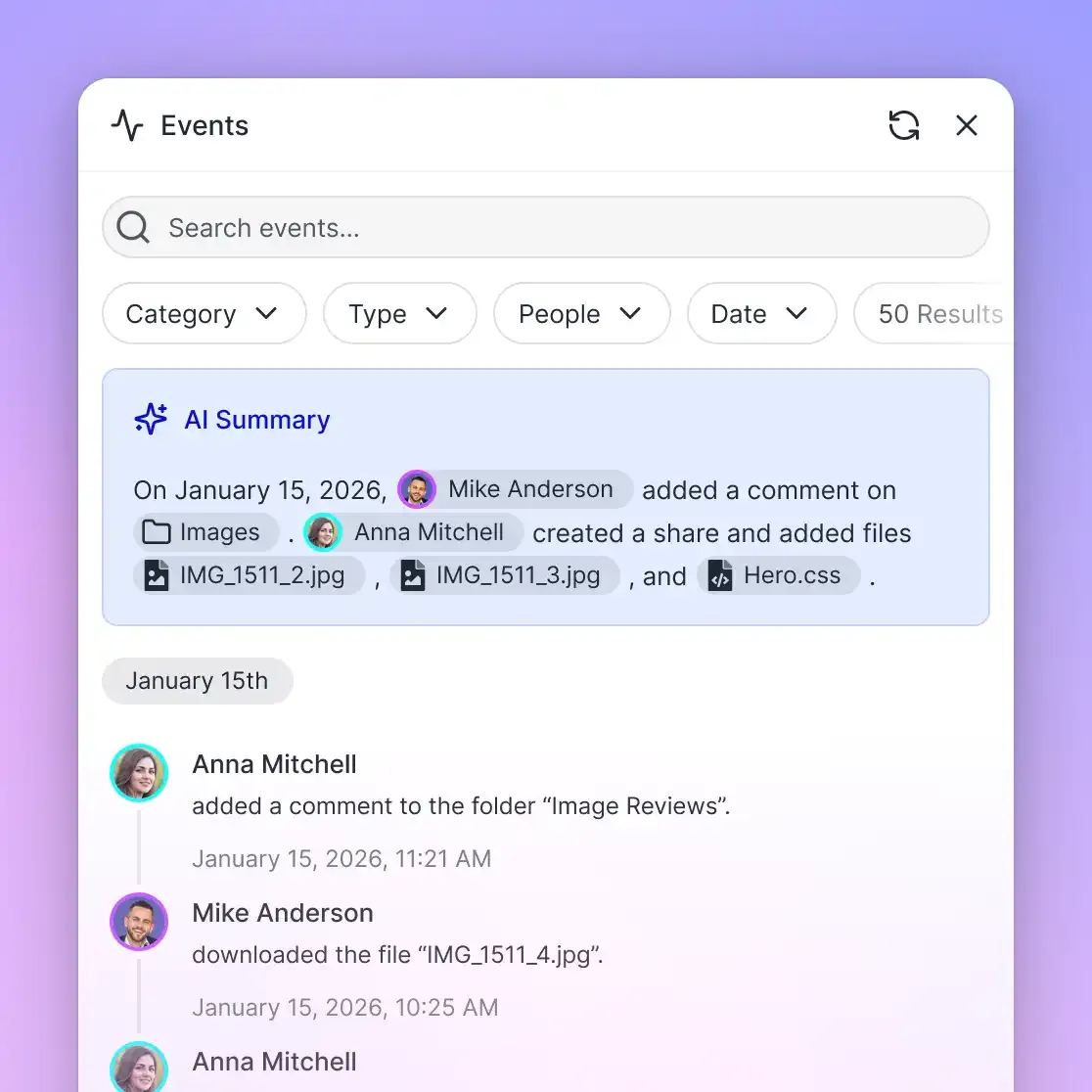
Every workspace action is recorded in a detailed activity log. When Claude queries a synchronized OneDrive document, updates a spreadsheet, or creates a Collaborative Note, Fastio logs the actor identity, action type, and exact timestamp. This log gives security leads and compliance officers complete visibility into how AI models interact with enterprise files.
Permissions can be restricted across organizations, workspaces, folders, and individual files. You can grant Claude read-only permissions across an entire project folder while reserving write privileges for specific output directories, preventing models from altering source materials.
Advisory File Leases for Concurrent Writers
When multiple autonomous agents or human team members work in the same workspace, simultaneous writes risk corrupting shared documents. Fastio provides advisory file leases to coordinate editing across teams.
An agent acquires an advisory lease before modifying a file. The lease displays the agent identifier so teammates know who is editing the asset. Leases expire automatically unless renewed by regular heartbeat requests, preventing abandoned locks from blocking work. If another agent attempts to acquire a locked file, Fastio returns HTTP 409, allowing the second agent to pause or read without overwriting. Advisory leases never lock files exclusively; concurrent writes are safely captured in per-file version history, allowing teams to review revisions and restore prior states at any time.
Ownership Transfer and Transparent Subscriptions
Fastio supports clean organizational handoffs through ownership transfer. An AI agent or technical consultant can establish a Fastio organization, configure workspaces, connect OneDrive directories, generate hybrid search indexes, and then transfer organization ownership to a human stakeholder via a secure claim link. The agent retains administrative operational access while the human assumes governance and billing control.
Fastio operates on transparent subscription tiers designed for teams and agent deployments. Creating an account is free; doing real work requires an organization on a paid subscription. Monthly plans start with a trial of up to 14 days (credit card required); annual plans have no trial. Plans are Starter at $9.99/mo, Business at $49.99/mo, and Enterprise at $199.99/mo. Within this workspace environment, seats and storage come included with each tier, and a monthly credit allowance meters artificial intelligence token operations. Learn more about deployment architecture on the storage for agents page and review plan details on the pricing page.
Sources
References used to verify factual claims in this guide.
-
SharePoint Online and OneDrive throttle delegated search queries that exceed 10 requests per second per user.
Frequently Asked Questions
Can Claude connect to personal OneDrive accounts?
Yes. While enterprise Microsoft Graph API integrations often require complex Azure Active Directory app registrations that personal accounts cannot configure, connecting personal OneDrive accounts through Fastio Cloud Import uses standard delegated OAuth authorization. You can connect and index personal OneDrive folders without requiring administrative tenant access or Azure developer portal configurations.
Why does Claude crash on OneDrive files-on-demand placeholders?
OneDrive Files On-Demand creates 0-byte placeholder files using NTFS reparse points on Windows or Apple File Provider dataless files on macOS to save disk space. When Claude Desktop or Claude Code attempts to read these local files directly off the disk, standard filesystem calls do not trigger network hydration. Claude receives an empty 0-byte buffer or stalls waiting for background downloads, leading to crashes and timeout errors.
How do I connect Claude to Microsoft OneDrive without admin consent?
Fastio uses the signed-in user's OAuth; some tenants require an administrator to approve third-party apps. Syncing your target folder into a Fastio workspace via Cloud Import connects using user-delegated scopes rather than custom high-privilege enterprise app registrations. Once synced, Claude queries the indexed workspace through Fastio's remote Model Context Protocol server at `https://mcp.fast.io/mcp/tools`.
What is the difference between connecting Claude via Composio versus an indexed Fastio workspace?
Composio acts as an action router that translates natural language prompts into real-time Microsoft Graph API calls, executing file downloads and folder listings sequentially. Fastio syncs your OneDrive folder into an intelligent workspace and pre-indexes documents for hybrid search. In the published multi-document audit at https://fast.io/benchmarks/, Fastio completed the task fastest and at the lowest cost of the connectors tested.
Can Claude write updated files or reports back to OneDrive?
Yes. By configuring Fastio Cloud Sync with two-way synchronization, Claude can write analysis briefs, modified documents, and Collaborative Notes to the workspace via MCP tools, and Fastio syncs those updates back to your Microsoft OneDrive folder on your chosen schedule.
Does syncing OneDrive to Fastio alter or duplicate source files?
One-way synchronization keeps original OneDrive files completely untouched. Fastio creates an indexed cloud mirror in your workspace for high-speed AI retrieval. Your team continues editing and managing files in Microsoft 365 as normal, while Claude queries the optimized workspace index.
Related Resources

Connect Microsoft OneDrive to Claude with Intelligent Workspaces
Keep your files in OneDrive, sync folders to an intelligent workspace, and let Claude search indexed documents over a remote MCP server. Start your 14-day free trial with credit card verification.