Remote MCP Server for Cloud Storage: Connecting AI Agents to Drive, Dropbox & OneDrive
A remote Model Context Protocol server over Streamable HTTP connects AI agents to cloud storage without local disk mounts or virtual filesystem stubs. By pairing remote MCP with cloud synchronization across Google Drive, Dropbox, Box, and OneDrive, distributed agents query indexed files with citation-backed hybrid search while human teams keep their existing folder structures.

Why Local Filesystem MCP Fails Hosted AI Agents
Most Model Context Protocol implementations assume an AI client running on a developer laptop spawning a local subprocess over standard input and output. That model collapses the moment an agent runs in a cloud container, a CI/CD runner, or a hosted service that needs to query corporate files in Google Drive, Dropbox, or OneDrive.
A remote MCP server for cloud storage is a network-accessible Model Context Protocol endpoint that exposes cloud storage backends (Google Drive, Dropbox, OneDrive, Fast.io) to AI agents over Streamable HTTP without requiring local disk mounts.
Understanding why remote MCP is necessary requires examining the failure modes of the default local pattern. When developers first experiment with MCP, they typically run npx @modelcontextprotocol/server-filesystem on their personal workstation. This configuration spawns a child process on the local operating system, communicates through standard input and standard output (stdio) file descriptors, and reads files directly from local storage paths like /Users/username/Documents.
This local stdio architecture works well for an individual engineer analyzing a single local repository in desktop Claude. However, it fails completely when deploying agents into production environments:
- Containerized and Cloud Environments: Autonomous agents increasingly execute inside Docker containers, Kubernetes pods, serverless functions, or cloud development environments like GitHub Actions and remote dev containers. These environments possess ephemeral filesystems. They do not have access to a developer's local hard drive or personal cloud sync folders. Mounting remote cloud drives into containers via FUSE or network file shares adds operational fragility, requires root or privileged container capabilities, and breaks down under network disconnects.
- The Files-On-Demand Stub Problem: Corporate desktop installations of Google Drive, Dropbox, and Microsoft OneDrive default to virtual filesystem sync. According to Microsoft Support documentation for OneDrive Files On-Demand, online-only files in cloud storage do not consume local drive space until opened. These sync clients keep placeholder metadata on disk and download full file payloads only when an application opens them. When a local filesystem MCP server inspects directory trees, it often triggers recursive downloads of gigabytes of cold stubs, saturating bandwidth and exhausting disk space.
- Single-Client Subprocess Isolation: The stdio transport is strictly a point-to-point connection tied to the lifecycle of the host application process. If you run three separate agents, such as a code generation agent in Cursor, a documentation agent in Claude Code, and an automated review agent in a CI pipeline, each agent requires its own isolated subprocess. They cannot share connection pools, cached indexes, or synchronization states.
- Lack of Centralized Access Control: Local filesystem servers inherit whatever permissions the local operating system user holds. There is no mechanism to enforce organizational access policies, maintain a verifiable activity history across multiple agents, or revoke access when an automated task concludes without modifying local operating system permissions.
Moving from a local stdio process to a remote MCP server running over HTTP solves these architectural limitations. A remote server acts as an independent, network-accessible service that multiple agents can query concurrently over authenticated endpoints.
Related guides
- Cloud Storage MCP: Connecting AI Agents to Drive, Dropbox, and OneDriveAI agents require access to files stored across Google Drive, Dropbox, Box, and OneDrive, but local filesystem...
- Remote MCP vs Local MCP: Architecture Patterns for Agent WorkspacesLocal MCP runs tool servers as child processes on a developer's workstation using stdio streams, while remote MCP hosts...
- How to Use the Google Cloud Storage MCP Server with AI AgentsConnecting autonomous AI agents to Google Cloud Storage buckets allows language models to inspect and retrieve...
- Remote Filesystem MCP Server: Cloud File Access for AI AgentsA remote filesystem MCP server exposes file read, write, and search tools over network transports such as Streamable...
- How to Connect Wasabi Hot Cloud Storage to AI Agents via MCP ServerConnecting to a Wasabi MCP server gives AI agents structured tool access to cloud storage buckets without exposing...
- How to Set Up a Remote MCP Server for AI AgentsA remote MCP server allows AI agents running locally to securely access tools and datasets hosted on a different...
More on this subject: MCP and Model Context Protocol (249 guides)
How Native Cloud Drive Connectors Compare to Remote MCP
When engineering teams recognize that agents need access to corporate documents, their first instinct is often to write custom integrations against native cloud storage APIs, such as the Google Drive API, Microsoft Graph API, Dropbox API, or Box API. While these native connectors provide raw programmatic access to files, they introduce severe operational friction when exposed directly to autonomous agents.
The first hurdle is enterprise authentication and consent. Building a custom agent script that calls the Microsoft Graph API to access OneDrive or SharePoint requires registering an application within the Microsoft Entra ID admin center. The script requires high-privilege permission scopes, such as Files.Read.All or Sites.Read.All. In corporate environments, IT security teams rarely grant tenant-wide administrative consent for individual developer scripts or experimental agent runtimes. Managing OAuth refresh token rotations, secure token storage in headless runners, and multi-tenant boundary checks creates significant operational overhead.
The second challenge is API rate limiting and query quotas. Native cloud storage APIs are designed for human collaboration applications, not high-frequency agent tool calling:
- Aggressive Throttling: Under burst query patterns, cloud drive APIs enforce strict request thresholds. According to Microsoft Learn throttling guidance, Microsoft Graph detects high request volumes and throttles applications by returning an HTTP 429 status code with a Retry-After header. Google Drive API similarly enforces per-user query limits, creating bottlenecks during deep directory traversals.
- Pagination and Deep Traversals: Cloud drives organize content in deeply nested hierarchies. Searching for a specific specification requires multiple sequential API calls to resolve folder IDs, page through file listings, and retrieve metadata. Each step introduces network latency and compounds agent execution time.
The most critical failure of native connectors, however, is context window exhaustion. Corporate cloud drives store content as formatted documents: Microsoft Word (.docx), PowerPoint (.pptx), Excel (.xlsx), and multi-page PDF manuals. Native connectors download these raw file payloads. When an agent attempts to answer a specific question by downloading and ingesting an entire lengthy technical specification or an extensive multi-tab spreadsheet, it dumps tens of thousands of tokens of irrelevant boilerplate directly into the LLM context window.
This raw document ingestion causes three direct problems:
- It inflates model inference costs by consuming massive token allowances on layout formatting and peripheral content.
- It degrades reasoning quality, as large volumes of irrelevant text dilute the model's focus and increase hallucinations.
- It frequently exceeds context limits altogether, causing the agent run to fail.
In connector evaluations published at fast.io/benchmarks, Fastio was measured the fastest and the lowest cost of the providers tested.
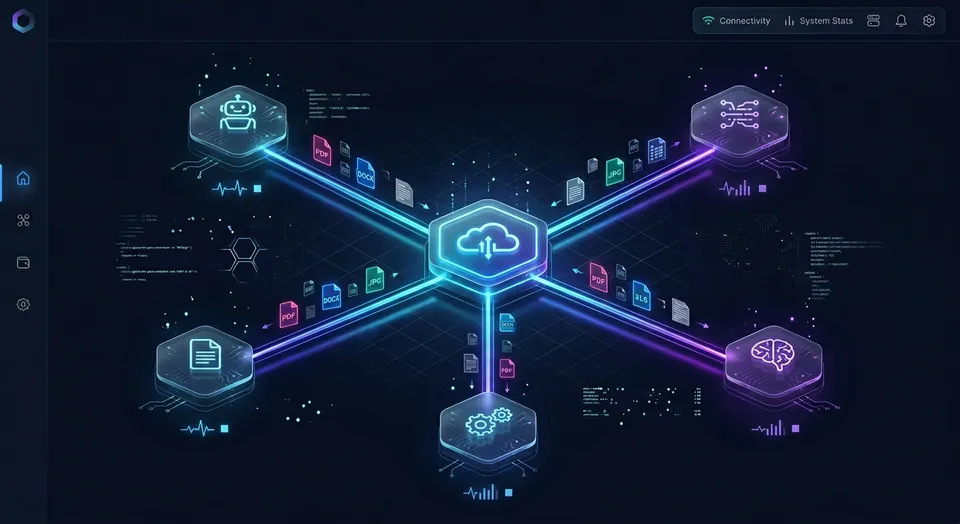
Instead of forcing the agent to download entire files across brittle API pipes, the remote MCP architecture separates storage synchronization from agent retrieval. The team keeps their existing storage in Google Drive, Dropbox, Box, or OneDrive. That storage syncs into a Fastio workspace. When an agent needs information, it connects to the remote MCP server and executes a targeted search across pre-indexed documents, retrieving only the exact passages and metadata required to fulfill the user's prompt.
Architecture of a Streamable HTTP Remote Storage Server
The Model Context Protocol specification establishes Streamable HTTP as the standard transport for remote, network-accessible servers, consolidating communication into a single, scalable HTTP endpoint.
Understanding the network and protocol mechanics of Streamable HTTP is essential for configuring and deploying remote storage connectors.
The Streamable HTTP Wire Protocol
Unlike stdio, which relies on standard input and output byte streams, Streamable HTTP operates over standard HTTP semantics:
- Unified Endpoint: The remote MCP server exposes a single network route per client type, such as
/mcp/codeor/mcp/tools. - JSON-RPC via HTTP POST: The client sends every JSON-RPC message, including initialization requests, tool listing queries, and tool execution calls, as an individual HTTP POST request.
- Content Negotiation: The client includes an
Accept: application/json, text/event-streamheader with each POST request. - Flexible Response Framing: The server can reply with a standard
application/jsonpayload for immediate, single-message responses, or it can open a request-scoped stream (text/event-stream) when returning progressive progress updates or chunked data. - Session Continuity: During the initial handshake, the server returns an
Mcp-Session-Idheader. The client echoes this session identifier along with theMCP-Protocol-Versionheader on all subsequent requests, allowing stateful session tracking across stateless HTTP connections.
Because Streamable HTTP uses standard HTTP request-response mechanics, remote storage MCP servers can sit cleanly behind standard cloud infrastructure components, including API gateways, reverse proxies, and cloud load balancers. They scale horizontally across container instances without requiring persistent, stateful socket pinning.
Security Model for Remote Storage MCP
Exposing a storage interface over the network introduces distinct security requirements that do not exist with local subprocesses:
- Origin Header Validation: To prevent DNS rebinding attacks where malicious web scripts in a user's browser attempt to issue requests to local or intranet MCP endpoints, the server validates the incoming
Originheader. Requests carrying unauthorized or spoofed origins are rejected with an HTTP 403 Forbidden response. - Authenticated Bearer Tokens: Cloud-hosted agents, CI/CD runners, and background worker containers authenticate by passing a scoped API key in the
Authorization: Bearer <api key>request header. This avoids interactive browser login prompts in headless environments. - OAuth 2.0 with Granular Permission Scoping: Interactive desktop and web clients authenticate using standard OAuth 2.0 flows. When connecting, users encounter a Review Permissions screen where they can select Read Only or Read & Write permissions and restrict the connector's reach to specific organizations and workspaces.
- Transport Layer Security: All production remote MCP communications require HTTPS to protect document payloads and authentication tokens in transit.
Raw JSON-RPC Handshake Example
To illustrate the Streamable HTTP transport in practice, consider an agent establishing a connection and invoking a search tool against a remote storage workspace:
POST /mcp/code HTTP/1.1
Host: mcp.fast.io
Authorization: Bearer your-fastio-api-key
Content-Type: application/json
Accept: application/json, text/event-stream
MCP-Protocol-Version: 2024-11-05

{
  "jsonrpc": "2.0",
  "id": 1,
  "method": "initialize",
  "params": {
    "protocolVersion": "2024-11-05",
    "capabilities": {
      "tools": {}
    },
    "clientInfo": {
      "name": "CustomCloudAgent",
      "version": "1.0.0"
    }
  }
}
The server responds with its capabilities and assigns a session identifier:
HTTP/1.1 200 OK
Content-Type: application/json
Mcp-Session-Id: sess_984f1a2b7c

{
  "jsonrpc": "2.0",
  "id": 1,
  "result": {
    "protocolVersion": "2024-11-05",
    "capabilities": {
      "tools": {}
    },
    "serverInfo": {
      "name": "Fast.io Remote MCP Server",
      "version": "2.0.0"
    }
  }
}
Once initialized, the agent calls the search tool to locate relevant documentation without downloading the underlying files:
POST /mcp/code HTTP/1.1
Host: mcp.fast.io
Authorization: Bearer your-fastio-api-key
Mcp-Session-Id: sess_984f1a2b7c
Content-Type: application/json
Accept: application/json, text/event-stream

{
  "jsonrpc": "2.0",
  "id": 2,
  "method": "tools/call",
  "params": {
    "name": "search",
    "arguments": {
      "query": "Kubernetes cluster disaster recovery policy"
    }
  }
}
The server executes hybrid search across indexed documents in the workspace and returns concise matching excerpts, source filenames, and document IDs.



Connect your AI agents to cloud storage with remote MCP
Deploy a persistent, intelligent workspace that syncs with Google Drive, Dropbox, Box, and OneDrive. Connect Claude, Cursor, and custom agents over Streamable HTTP with hybrid search and full version history. Monthly plans start with a 14-day free trial.
How to Configure a Remote MCP Server for Cloud Storage
Connecting autonomous agents and developer tools to remote cloud storage requires pointing the client application at the correct remote endpoint and completing authentication.
Fast.io hosts its remote Model Context Protocol server at mcp.fast.io over Streamable HTTP, providing specialized endpoints tailored to different client architectures:
- Claude Apps and General Agent Runtimes: Claude Desktop, Claude Web, Claude Mobile, Claude Cowork, OpenClaw, Hermes Agent, and generic MCP clients connect to
https://mcp.fast.io/mcp/tools. - Coding Agents and IDE Environments: Claude Code, Cursor, Cline, Devin, Gemini CLI, Qwen Code, and terminal development agents connect to
https://mcp.fast.io/mcp/code. - ChatGPT and Codex: The Fastio plugin in the ChatGPT plugin directory is preferred. For environments requiring a custom MCP server configuration, use
https://mcp.fast.io/mcp/operations.
Detailed setup walkthroughs are maintained at mcp.fast.io/docs, and tool schemas and action references are documented at mcp.fast.io/skill.md.
Client Configuration Examples
1. Cursor IDE Setup
To connect Cursor to remote cloud storage, configure the project or global MCP settings file. Edit ~/.cursor/mcp.json (or .cursor/mcp.json in your repository root):
{
  "mcpServers": {
    "fast-io": {
      "url": "https://mcp.fast.io/mcp/code"
    }
  }
}
Cursor connects to the endpoint and launches an interactive OAuth authorization window in your browser, allowing you to link your Fast.io organization and select your workspace.
2. Claude Code Command-Line Configuration
To register the remote storage server in Claude Code, execute the mcp add command in your terminal:
claude mcp add --transport http fast-io https://mcp.fast.io/mcp/code
After adding the server, complete OAuth authentication in your browser to confirm available tools.
3. Headless Agent in TypeScript or Node.js
For autonomous background agents running in Docker containers or CI pipelines, pass a scoped API key using the Authorization header. Here is an example using the official Model Context Protocol TypeScript SDK:
import { Client } from "@modelcontextprotocol/sdk/client/index.js";
import { StreamableHttpClientTransport } from "@modelcontextprotocol/sdk/client/streamableHttp.js";

const transport = new StreamableHttpClientTransport(
  new URL("https://mcp.fast.io/mcp/code"),
  {
    headers: {
      Authorization: `Bearer ${process.env.FASTIO_API_KEY || "your-fastio-api-key"}`,
      "MCP-Protocol-Version": "2024-11-05",
    },
  }
);

const client = new Client(
  { name: "PipelineAgent", version: "1.0.0" },
  { capabilities: { tools: {} } }
);

await client.connect(transport);

// Search indexed documents across synced cloud storage
const searchResult = await client.callTool({
  name: "search",
  arguments: {
    query: "API rate limiting and disaster recovery guidelines",
  },
});

console.log(searchResult);
Synchronizing Corporate Drives to Intelligent Workspaces
To bridge enterprise file repositories into Fast.io workspaces without moving away from existing cloud infrastructure, administrators use Cloud Sync.
Cloud Sync connects Google Drive, Dropbox, Box and OneDrive folders to a workspace, one-way or two-way, on a schedule or on demand. SharePoint document libraries connect directly through the OneDrive connector.
Cloud Sync operates on scheduled intervals or manual triggers rather than continuous or real-time sync. This scheduled cadence prevents continuous API polling and ensures that files update in predictable batches.
Once files sync into the workspace, Fast.io Intelligence Mode automatically parses and indexes them. Intelligence Mode applies hybrid search, combining full-text keyword indexing, vector embeddings for semantic similarity, and metadata filtering. When an agent queries the workspace over remote MCP, it receives pinpoint answers with document citations rather than raw file downloads.
For teams handling high volumes of structured records, such as contracts, invoices, or specifications, Fast.io provides Metadata Views. Metadata Views turn unstructured documents into live, queryable databases. Users define the fields they need extracted in natural language, and AI populates typed columns (Text, Integer, Decimal, Boolean, URL, JSON, Date & Time) without templates or manual extraction rules. Agents can query these structured views over MCP to retrieve precise data points across thousands of files instantly.
How Distributed Agents Coordinate Concurrent Storage Access
In modern development environments, multiple autonomous agents frequently work alongside human team members on the same projects. One agent might generate API documentation, a second agent audits code against compliance policies, and human developers draft application logic.
When multiple distributed agents access shared cloud storage concurrently, managing writes, tracking changes, and enforcing security boundaries becomes paramount. Fast.io provides built-in mechanisms designed for multi-agent coordination.
Per-File Version History and Concurrent Writes
Traditional shared file systems can suffer from silent data loss when two processes write to the same path simultaneously. Fast.io resolves this through per-file version history.
Every workspace preserves a full, recoverable version history for every file. When an agent uploads an updated draft of an architectural diagram or specification, Fast.io stores the update as a new version checkpoint. Prior versions remain accessible, auditable, and restorable. If two agents write to the same file path concurrently, both updates land safely as sequential version entries rather than overwriting or corrupting file data.
Advisory File Leases
To coordinate multi-step workflows where an agent needs to perform sequential edits without interference, Fast.io provides advisory file locks through its MCP toolset.
An agent acquires an advisory file lease using the lock-acquire action on the storage_manage tool, checks lease status with lock-status on the storage tool, and releases the lease with lock-release on storage_manage.
Advisory locks are designed specifically for cooperative agent environments:
- Heartbeat Renewal: A lock is a temporary lease that expires automatically unless the holding agent periodically heartbeats the lock. This prevents abandoned locks if an agent container crashes or encounters an unhandled exception.
- Visibility Across Members: Other human team members and agents can inspect who holds the lock and when it was granted.
- Non-Blocking Writes: Advisory locks do not enforce hard operating system write blocks. If an urgent human edit lands while a lock is held, the write succeeds and creates a new version, preserving human agency and preventing workflow deadlocks.
Scoped Access Control and Detailed Auditability
Security boundaries in Fast.io are enforced at organization, workspace, and share levels through member roles. Permissions are never configured at the individual folder or file level. Every member of a workspace accesses files according to their assigned organizational role. When you need to restrict an agent or external collaborator to a specific subset of files, you create a dedicated workspace or a branded share.
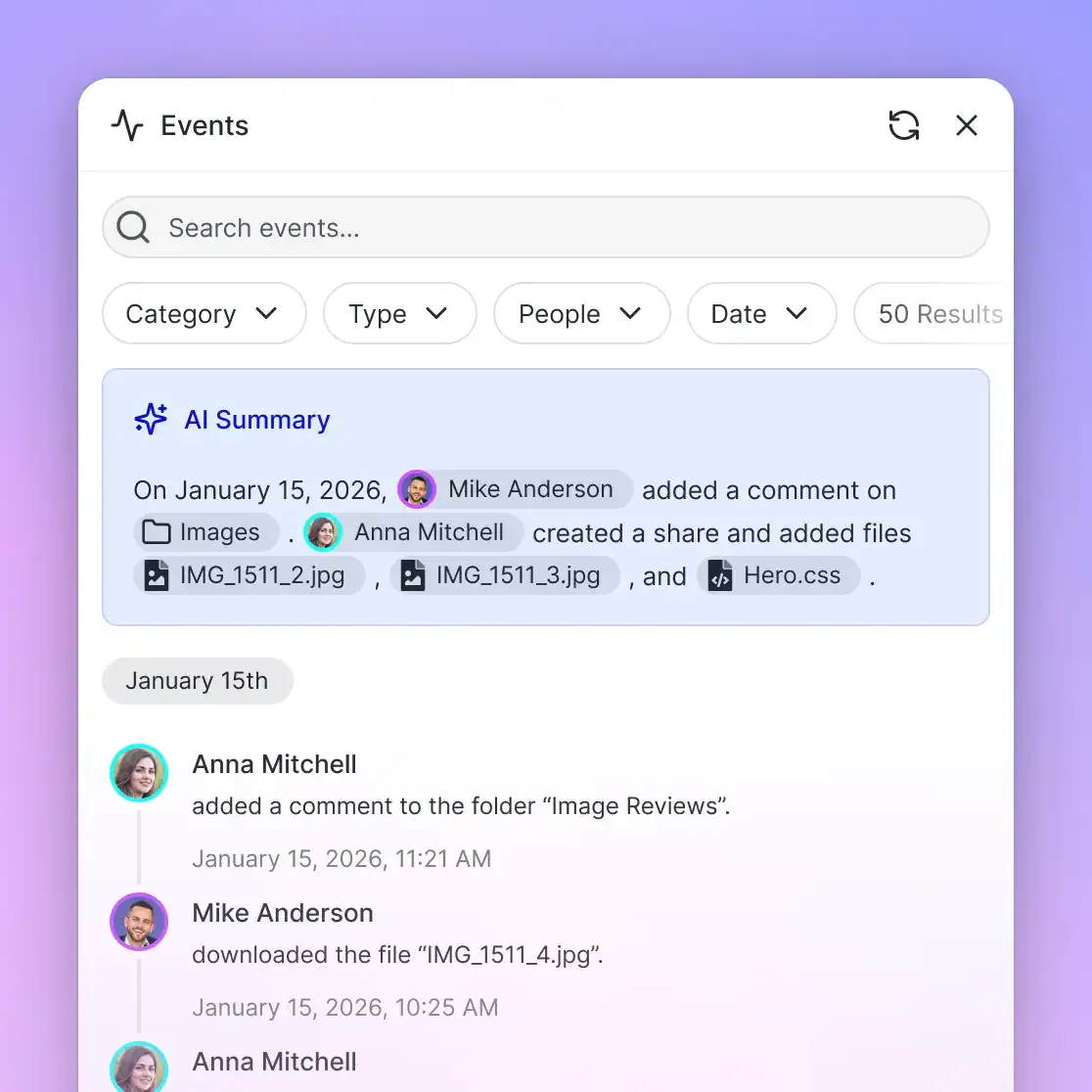
Every action taken within a workspace is recorded in a detailed activity log. The activity log captures what changed and who made the change, tracking both human users and autonomous agents. The log records file creations, modifications, renames, moves, deletions, membership updates, and share creations. This provides engineering leads with a complete operational trail of which agent generated or modified specific project assets.
Agent-to-Human Ownership Transfer
A unique operational pattern supported by Fast.io is ownership transfer. In automated agency or DevOps workflows, an autonomous agent can create an organization, configure workspaces, sync external storage folders, and generate project assets.
Once the initial setup is complete, the agent can transfer ownership of the organization to a human stakeholder. The human receives full administrative control and billing management, while the agent retains scoped admin access to continue maintaining files and responding to queries over the remote MCP connection.
Subscription Plans and Trial Options
Monthly plans start with a 14-day free trial, which requires a credit card and ends early if trial credits run out. Creating an account is free; doing real work requires an organization on a paid subscription. Storage tiers and credit allowances for Starter, Business, and Enterprise plans are detailed on Fast.io pricing.
Sources
References used to verify factual claims in this guide.
-
Microsoft Graph detects high request volumes and throttles applications by returning an HTTP 429 status code with a Retry-After header.
-
Online-only files in cloud storage do not consume local drive space until opened.
Frequently Asked Questions
What is a remote MCP server for cloud storage?
A remote MCP server for cloud storage is a network-accessible Model Context Protocol endpoint that exposes cloud storage backends (Google Drive, Dropbox, OneDrive, Fast.io) to AI agents over Streamable HTTP without requiring local disk mounts. Instead of running a local child process that reads files from a workstation hard drive, remote MCP allows hosted and containerized AI agents to authenticate over HTTP, search indexed file repositories, and retrieve relevant document passages.
What is the difference between local stdio MCP and remote HTTP MCP?
Local stdio MCP launches a server as a subprocess on the local machine and communicates via standard input and standard output file descriptors. It requires local filesystem paths and is restricted to a single client application. Remote HTTP MCP runs as an independent network service using the Streamable HTTP transport. It supports concurrent connections from multiple distributed agents, operates in containerized environments without local disks, and enforces network authentication.
How do you connect an AI agent to cloud storage using MCP?
You connect an AI agent to cloud storage by configuring the agent client with the remote MCP server URL. For Fast.io, coding agents connect to `https://mcp.fast.io/mcp/code` and desktop or general clients connect to `https://mcp.fast.io/mcp/tools`. The agent authenticates using OAuth 2.0 in desktop apps or via a Bearer API key in headless environments. The agent can then call built-in MCP tools to search indexed files, inspect metadata, and read document content.
Does Fast.io sync with Google Drive, Dropbox, Box, and OneDrive?
Yes. Cloud Sync connects Google Drive, Dropbox, Box and OneDrive folders to a workspace, one-way or two-way, on a schedule or on demand. SharePoint document libraries connect directly through the OneDrive connector. Once synced, Fast.io automatically indexes the files for hybrid semantic and keyword search.
Can multiple AI agents query the same remote MCP storage workspace simultaneously?
Yes. Because the remote MCP server operates over Streamable HTTP rather than a single-process stdio pipe, multiple agents running in different environments can connect to the same workspace simultaneously. Fast.io coordinates concurrent access through per-file version history and advisory file leases.
How does remote MCP prevent context window exhaustion when searching corporate documents?
Instead of downloading raw, multi-page PDF or Word files into the LLM context window, Fast.io pre-indexes synced files using Intelligence Mode. When an agent queries the workspace over remote MCP, Fast.io performs hybrid search across the index and returns only the relevant excerpts and citations, preserving model context space and reducing token consumption.
Related Resources

Connect your AI agents to cloud storage with remote MCP
Deploy a persistent, intelligent workspace that syncs with Google Drive, Dropbox, Box, and OneDrive. Connect Claude, Cursor, and custom agents over Streamable HTTP with hybrid search and full version history. Monthly plans start with a 14-day free trial.