Small Business Cloud Storage: How to Choose the Right Platform
Small business cloud storage gives teams organization-owned file storage, admin controls, and external sharing that personal accounts cannot match. When folders mix internal records with client work or AI assistants need access to specific projects without exposing an entire drive, how a platform scopes access matters as much as raw capacity. This guide compares pricing models, permissions, and major business cloud storage options.

What Small Business Cloud Storage Actually Solves
When a contractor leaves a company with project files stored in a personal drive, or a team connects an AI assistant like Claude or ChatGPT to a shared company folder and exposes internal spreadsheets alongside client deliverables, the root cause is the same: the storage layer lacks workspace boundaries and organization ownership.
Small business cloud storage replaces scattered personal accounts and flat shared drives with organization-owned document storage, admin controls, and scoped user permissions. Whether you are evaluating cloud storage for small business teams of five or planning file storage for enterprise departments with hundreds of collaborators, business cloud storage handles five core jobs:
- Organization-owned business file hosting: Files belong to the company organization rather than an individual employee login, so project history stays intact when staff or contractors change.
- Scoped user permissions and admin controls: Administrators control who can view, upload, edit, or share documents across workspaces and external shares without rebuilding years of nested folders.
- External cloud sharing for business: Teams send deliverables or collect client uploads through branded portals and links without buying a paid user seat for every outside guest.
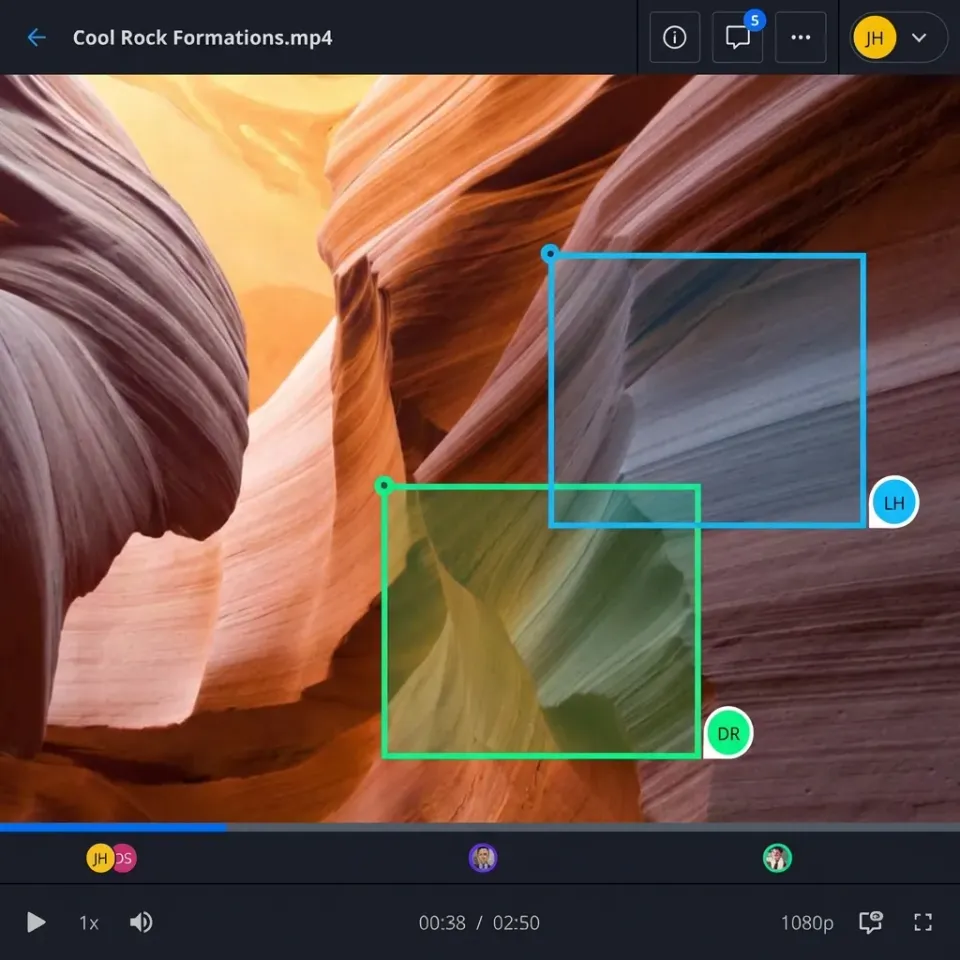
- In-browser previews and review tools: Team members preview video, images, and documents in the browser, pin anchored comments to specific pages or frames, and track per-file version history.
- Scoped AI and existing-drive connections: Workspaces sync selected folders from Google Drive, SharePoint, Box, or Dropbox so teammates and AI agents work on the same scoped files without migrating the source drive.
Helpful references: Fastio Workspaces, Fastio Collaboration, and Fastio AI.
Related guides
- Folder Sharing Permissions: Best Practices for Cloud and Team WorkspacesFolder sharing permissions determine who can read, edit, upload, or administer assets within shared workspace...
- Box vs Dropbox: Which Cloud Storage Is Right for Your Business?Box focuses on enterprise content management and security, while Dropbox emphasizes personal and team file sync. Both...
- Best Nextcloud Alternatives for Teams Who Don't Want to Self-HostNextcloud is a powerful self-hosted file sharing platform, but managing your own server takes real work. If you're...
- How to Choose Cloud Storage for Teams That Actually WorksMost team cloud storage is just personal storage with sharing bolted on.
- How to Choose Enterprise Cloud Storage for Media TeamsEnterprise cloud storage is secure cloud infrastructure built for large organizations that need centralized control,...
- How to Choose Video Cloud Storage for CreatorsVideo cloud storage is online storage optimized for large video files, offering streaming playback, organization, and...
More on this subject: File Sharing (155 guides)
Per-Seat vs. Plan-Based Pricing for Business Cloud Storage
Pricing for cloud storage for business falls into two models, and the difference determines what you pay once external clients, agencies, or contractors join your projects.
Per-Seat Subscription Pricing
Established providers such as Dropbox, Box, Google Workspace, and Microsoft 365 charge per user per month. Per-seat pricing is straightforward when only full-time employees access the drive. Costs climb when outside collaborators need full accounts, and on some tiers (Box Starter and Business, for example) external collaborators beyond a plan limit count toward paid seats.
Plan-Based Workspace Pricing
Workspace-oriented platforms include a set number of team seats and storage capacity in each plan and allow external guests to collaborate through shares without taking a paid seat. On Fastio, plans with 3 to 30 seats cover small and mid-sized teams (with extra seats available on higher tiers; see fast.io/pricing for current plan pricing). Creating an account is free, and every organization runs on a subscription with a 14-day free trial on monthly plans (credit card required; yearly plans start paid). Storage and member seats come with the plan, while AI work such as semantic search, document chat, and field extraction is metered by monthly credits.
How Much Cloud Storage Does a Small Business Need?
Storage requirements depend on the file formats your team produces and how long you retain client archives.
- Document-centric teams (legal, finance, consulting, executive search): Teams working primarily with PDFs, Word contracts, spreadsheets, and presentations rarely fill a terabyte on file weight alone. Their bottleneck is finding clauses across thousands of pages and isolating one workspace per deal, matter, or client search. Plans between 250 GB and 1 TB cover most document-centric teams.
- Design studios, architecture firms, and marketing teams: High-resolution photos, Photoshop (
PSD) and Illustrator (AI) files, RAW camera assets, and CAD drawings accumulate rapidly. Studios sharing project libraries with outside agencies typically need 1 TB to 5 TB of capacity. - Video production, media, and large business archives: Raw camera footage, multi-track audio, and multi-terabyte datasets require 5 TB to 25 TB or more, paired with chunked uploads for large files and adaptive streaming so reviewers do not have to download full folder trees.
Sizing rule of thumb: Take your current active and archived file total, add 50% for growth over the next two years, and double that number to account for version history and rich media. Check maximum single-file upload limits alongside total capacity so large video exports or archive bundles do not hit per-file caps.


Organize Team Files, Client Shares, and AI Access in Fastio
Give your team organization-owned workspaces, branded client portals, Cloud Sync for existing drives, and scoped MCP access for AI assistants. Monthly plans start with a 14-day free trial.
Which Cloud Storage Plans Include Business Admin Controls and User Permissions?
Business plans from Box, Dropbox, Google Workspace, Microsoft 365, and Fastio all include organization ownership and central user management, but they differ in how administrators scope access for people and AI tools.
Organization, Workspace, and Share Permissions
In traditional corporate cloud file storage, permissions pile up across years of subfolders until user-level permissions are much wider than what a specific contractor or AI assistant should see. Fastio grants role-based access at the organization, workspace, and share level. Every workspace member accesses the workspace according to their role. When a team, client, or AI agent needs access to only one project or a single folder, an administrator places those files in a dedicated workspace or a scoped share.
Encryption and Share Protections
Files are encrypted in transit and at rest. When sharing outside the company, administrators can require passwords on shares, set link expiration dates, and disable file downloads so external recipients view documents or media in the browser without saving local copies.
Detailed Activity Logs and Enterprise Controls
Administrators need visibility when employees, guests, and AI agents work in shared folders. Fastio provides a detailed activity log that records uploads, edits, moves, deletions, membership and permission changes, and share creation across the organization. Enterprise plans add legal holds, a compliance auditor role, security alerts, and an audit stream to a SIEM.
Ownership Transfer
When an agent sets up an organization and workspace structure for a client engagement, ownership transfer lets the agent hand the organization to the client administrator with a claim link once setup is complete.

Collaboration, Client Sharing, and AI Workspace Features
Modern business file sharing cloud platforms do more than store folders. They combine external delivery, media review, document signing, and AI retrieval in the same workspace.
Branded Shares and Client Portals
Instead of emailing attachments or generic drive links, teams use branded shares tailored to the direction of work: Send shares for delivering files, Receive shares for collecting uploads from clients, and Exchange shares for two-way project collaboration. Branded client portals add custom logos, colors, and backgrounds, and external guests open shares or portals by link without creating an account.
In-Browser Previews and Anchored Comments
Collaborators can preview PDFs, spreadsheets, presentations, code, PSDs, AI files, RAW photos, CAD drawings, waveform audio, and video in the browser using HLS adaptive streaming. Team members and signed-in reviewers leave anchored comments pinned to a specific file version, including frame-accurate video timestamps, image regions, and PDF pages.
Version History, File Locks, and Co-Edited Notes
Every file maintains per-file version history so prior versions can be restored if an edit or agent write needs to be rolled back. To coordinate edits across teammates and agents, advisory per-file locks let a writer acquire a lease, renew it by heartbeat, and release it when done, with override available to anyone holding write permission. Alongside files, workspace Notes support live co-editing with visible cursors for people and agents.
Built-In E-Signature
Teams can send agreements and sign-off documents for e-signature directly from a workspace to sequential or parallel signers. Signers need no account, senders can add an optional passcode per signer, and the signed PDF is filed back into the workspace with an audit certificate that records each signer's IP address and browser.
AI Search, Metadata Views, and MCP Connections
When workspace intelligence is turned on, files are indexed for hybrid full-text and semantic search plus chat that cites specific files, pages, and snippets. Metadata Views extract structured fields from documents into a sortable, filterable grid. To connect AI assistants with workspace-level scoping, Fastio provides a consolidated MCP toolset at https://mcp.fast.io/mcp/code for coding agents, https://mcp.fast.io/mcp/tools for Claude, and the Fastio plugin or https://mcp.fast.io/mcp/operations for ChatGPT.

Comparing Small Business Cloud Storage and Enterprise Providers
Here is how the primary small business cloud storage platforms compare across daily workflows:
Dropbox Business
Known for desktop folder syncing and broad third-party app connections. Per-seat monthly pricing works well for small internal teams.
Best for: Small internal teams focused on desktop folder sync.
Box
Built for corporate document management and governance across large departments. Box uses per-seat pricing and centers on document repositories and enterprise admin policies.
Best for: Organizations standardized on Box for corporate document storage.
Google Drive (Google Workspace)
Bundled with Gmail, Google Docs, Sheets, and Slides. Shared Drives solve the problem of files being tied to individual employee accounts, though permission management across deep folder trees can still become complex when scoping folders for external guests or AI tools.
Best for: Teams that draft and edit most of their work inside Google Docs and Sheets.
Microsoft OneDrive and SharePoint
Deeply integrated with Microsoft 365. Teams that live in Word, Excel, and PowerPoint get storage included in their Microsoft 365 licenses, while IT administrators manage site libraries in SharePoint.
Best for: Microsoft 365 organizations managing internal Office documents.
FileCloud
Offers both hosted cloud storage and self-hosted server deployments for organizations that want to run storage on their own infrastructure.
Best for: IT teams that need self-hosted private cloud storage on company servers.
Fastio
An organization-owned workspace platform for teams and AI agents. Plans include 3 to 30 seats with bundled storage, and guests who open shares and portals do not take a seat. Features include HLS video streaming, in-browser previews of design and camera formats, anchored comments, advisory file locks, e-signature, metadata views, and Cloud Sync with Google Drive, Dropbox, Box, and OneDrive.
Best for: Small and mid-sized businesses that share files with clients or need scoped workspaces for Claude, ChatGPT, and AI agents without migrating off their existing drives.
Is Cloud Storage Safe for Business?
Business cloud storage protects company files better than local office file servers or employee laptops when configured with clear access boundaries:
- Encryption in transit and at rest: Business platforms encrypt files while moving across networks and while stored on disk.
- Workspace-scoped permissions: Instead of exposing an entire corporate drive to every user or connected AI assistant, administrators restrict each workspace and share to the people and agents assigned to that project.
- Controlled external links: Expiring links, share passwords, and disabled downloads keep client deliverables from staying open indefinitely.
- On-demand streaming instead of full local copies: Syncing entire company folder trees to employee laptops consumes disk space and leaves local copies on every device. Browser-based streaming and previews let teams inspect large media and documents on demand. Mac and Windows desktop apps are also available.
Connecting Existing Drives with Cloud Sync vs. Migrating
Adopting a new workspace platform does not require moving every folder out of SharePoint, Google Drive, Box, or Dropbox.
Sync Selected Folders Without Migrating
Many small and mid-sized businesses keep their primary archive in Google Drive, SharePoint, Box, or Dropbox, where restructuring years of folders is not practical. Fastio Cloud Sync brings selected folders from Google Drive, Dropbox, Box, and OneDrive (including SharePoint document libraries through OneDrive for Business) into a Fastio workspace on a schedule or on demand, one-way or two-way. One-way sync keeps the workspace updated for AI search, metadata views, or client sharing without altering the source drive.
Running a Phased Migration
When you are retiring a legacy file server or replacing an older cloud provider altogether, move in stages:
- Audit active vs. archived folders: Separate active client and project folders from cold archives so daily work moves first.
- Organize by workspace: Create one workspace per client, deal, matter, or department rather than copying over tangled subfolder permissions.
- Use one-time cloud import or chunked upload: Import existing folders from Google Drive, Dropbox, Box, or OneDrive, or upload local directories.
- Replace external links gradually: Run both systems in parallel during transition, issue new branded share or portal links to clients, and verify that all local changes are uploaded before retiring the old storage.
Sources
References used to verify factual claims in this guide.
-
Deeply integrated with Microsoft 365.
Frequently Asked Questions
What is the best small business cloud storage?
The right fit depends on how your team works. Google Drive and Microsoft OneDrive suit teams working mostly inside Google Docs or Microsoft 365 files. Dropbox Business and Box fit traditional folder syncing and corporate document repositories. Fastio fits small and mid-sized teams (with plans covering 3 to 30 seats) that want organization-owned workspaces, branded client portals where guests do not take a seat, in-browser media previews, Cloud Sync for existing drives, and scoped MCP connections for AI assistants.
Which cloud storage plans include business admin controls and user permissions?
Business plans from Dropbox Business, Box, Google Workspace, Microsoft 365, and Fastio all include organization ownership, admin consoles, user permission management, and activity tracking. Fastio sets role-based permissions at the organization, workspace, and share level, includes a detailed activity log of file and permission changes, and supports ownership transfer via claim links.
How much cloud storage does a small business need?
Document-focused businesses in legal, finance, consulting, and executive search typically need 250 GB to 1 TB. Design, architecture, and marketing teams working with PSD, AI, RAW, and CAD files usually need 1 TB to 5 TB. Video production and media teams often require 5 TB to 25 TB or more. A practical rule is to take your current storage total, add 50% for two-year growth, and double it for version history and media assets.
Is cloud storage safe for business?
Business cloud storage is safer than storing files on employee laptops or a single office server because data is encrypted in transit and at rest, and administrators can isolate projects into separate workspaces, protect external shares with passwords and expiration dates, disable downloads for view-only review, and monitor changes in a detailed activity log.
What is the difference between consumer and business cloud storage?
Consumer cloud storage ties files to an individual email account with basic link sharing. Business cloud storage places files under organization ownership so company data stays put when employees or contractors leave. Business platforms add admin controls and role-based permissions; Fastio also adds branded portals, advisory file locks, e-signature, and scoped AI access.
Can we connect existing Google Drive or SharePoint folders without migrating?
Yes. Fastio Cloud Sync connects folders from Google Drive, Dropbox, Box, and OneDrive (including SharePoint document libraries through OneDrive for Business) into a workspace on a schedule or on demand, one-way or two-way. Your team and connected AI assistants can work in a scoped workspace while the files remain in your existing drive.
Related Resources

Organize Team Files, Client Shares, and AI Access in Fastio
Give your team organization-owned workspaces, branded client portals, Cloud Sync for existing drives, and scoped MCP access for AI assistants. Monthly plans start with a 14-day free trial.